Here at the shop, our Epson large format printer is exposed to
wide variations of temperature changes which can contribute to
clogged printer heads over extended periods of time. [Sidebar:
See what other factors can
contribute to clogged heads]
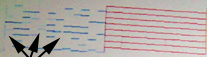 |
Fig 1.0 - Results of nozzle check
show horizontal banding |
Recently, we noticed that our print quality was decreasing and
after running a nozzle check we noticed several horizontal bands
missing for a few of our colors (See Fig 1.0
on left).
The first step we took was to run the cleaning cycle using the Epson Printer Control Panel.
Epson recommends running 6 cycles of cleaning and nozzle check.
If, after 6 cycles, there is still no improvement in the nozzle check, they recommend changing the cartridge. If that yields no results Epson recommends servicing the printer.
However, before calling Epson for servicing, there is a more powerful cleaning method that can be attempted using Simple Green All purpose cleaning solution.
Steps for Cleaning
Pre-requisites:
- A gallon of Simple Green All-Purpose Cleaner - commonly found in the cleaning section of Home Depot
- Bulk Ink Delivery System - required for pushing simple green solution through printer
Power Cleaning Instructions:
- Make sure your Bulk Ink Cartridges and Bottles are empty. This cleaning will push all the solution from the Bulk Ink Bottle through to the cartridge.
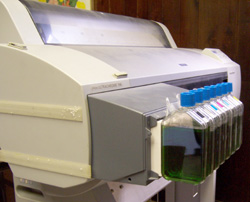 |
Epson 7600 with Simple Green Cleaning Solution |
- Fill up each Bulk Ink Bottle halfway with the Simple Green Cleaner.
- For each bottle, use the supplied Hand Pump to move cleaner from bottle into cartridge. You should fill the cartridges up to the septum level.
- Power up Epson Printer while holding UP, DOWN and CUT/EJECT buttons on Control Panel.
- Test Check will appear
- Press the DOWN arrow TWICE to chose "Cleaning" option
- Press the RIGHT arrow ONCE to chose STD.KKO
- Press the UP arrow ONCE to chose "Initial Fill"
- Printer will begin to pull Simple Green from cartridges into printer
- After letting the solution soak overnight, remove as much solution of the bottles and cartridges as possible
Test Cleaning using Dye Sublimation Inks:
- Fill up empty bottles with dye sublimation ink
- Use hand pump to move ink from bottle into cartridges. You should fill the cartridges up to the septum level.
- Then, using the Epson Printer Control Panel, execute an initial fill with the dye sublimation ink. (Steps 4 to 8 from Power Cleaning Instructions)
- Perform one regular cleaning
- Perform a nozzle check


 Print
Print