Frequently
Asked Questions - Dye Sublimation
A. General
- What is the Total Solutions Package?
- What service plan is offered with the Total Solutions
Package?
- How can I contact you for more information?
- Can I use the total solution package to sublimate
images onto sports uniforms? (i.e hockey, basketball, baseball,
etc)?
- Can I use total solution package for sublimation
onto glass surfaces?
- How does the dye sublimation process compare to
screen printing?
- Is dye sublimation suitable for trade show booth
backdrops?
- How does small format sublimation compare to large
format sublimation?
- What training is offered through the total solution
package?
- Can the dye sublimation process be used for printing
on snowboards?
B. Software
- What computer system requirements are required
to run the Ergosoft Posterprint or Wasatch SoftRip TX?
- What Operating System is suggested to run with
the Wasatch SoftRip TX?
- What is the advantage of using Wasatch SoftRip
TX with my Large format printer?
- What support plan is offered with Wasatch SoftRip
TX for Textile Printers?
- How does Wasatch Softrip handle creating variable
data graphics (i.e. customized uniforms)
- What file formats does Wasatch Softrip support?
- What do I need to check to ensure Wasatch is setup
for printing?
C. Heat Transfer Presses
- How do I choose the right Heat Transfer Press?
- What's the difference between a Rotary Drum Heat
press verses Platen Heat presses?
- What are the typical life cycles of the heat
transfer press heating elements and how difficult are they to
replace?
- Are there any special considerations as to where
the machine should be installed in our production plant?
- Which heat transfer presses are capable of adhering
a high vision reflective strip to clothing?
- Which heat transfer machines do you recommend
for printing t-shirts?
- What are the advantages of using a rotary Drum
Heat Transfer Press?
- What sort of service do you offer for the heat
transfer presses? Are replacement parts readily available?
- Which heat presses do you recommend for sublimation
printing for cyclewear?
- I sublimate images on tote bags - which press
is suitable for my business?
- What is the difference between the AIt Press
1550PA vs the AIT Press 1550PLC with Programmable Logic Controller?
- I want to print onto poly-lycra but I'm concerned
about stretching the goods too much when they pass through the
heat press?
D. Ink Jet Printers
- What are the advantages of Epson's Piezo Printheads?
- What are the main differences between the Epson
9600 & Epson 7600?
- What are the print speeds for the Epson 7600
and Epson 9600?
- Will the Epson Printer Software properly monitor
ink levels when the Sawgrass Inks cartridges are installed?
- What are the print speeds for the Mimaki JV4 (JV4-130,
JV4-160 & JV4-180)?
- Can I switch between dye sublimation inks and
regular inks using my epson printer?
- What connections do the Epson Printers support
and which one do you recommend using?
- What maintenance procedures are recommended for
my Epson Printer?
- How can I increase the drying time of my prints?
- What printers are supported by sawgrass's Sublijet
and Artainium inks?
E. Sublimation Inks
- What type of paper is recommended to use with
the Epson 7600/9600 and Sublijet transfer inks?
- What are the supported substrates that Sublijet
Sublimation Inks can be used on?
- What ink cartridge sizes are available for Sublijet
digital transfer inks when equipped with the Epson 7600 or 9600
printers?
- How do Sublijet Inks work?
- Can I use sublimation inks on darker substrates/materials?
- Will sublimation work on cotton surfaces?
- How can I figure out how much ink I will need
for my production requirements?
- Can I sublimate on blended fabric with polyester
and cotton? How much polyester is required?
- How much area does 1 liter of ink cover?
- How resistant are the sublimation inks to UV
fading?
F. Digital Wide Format Dryer
- How should I position the heater in relation to
the printer?
- How do I determine what level to set the heater
at for my substrates?
- I use heat sensitive substrates, how can I regulate
the heat output of the digital dryer?
|
|
A. General |
A1. What is the Total Solutions
Package? |
The total solutions package is offered by Jesse
J. Heap & Son as a "turnkey" solution geared towards
Large Format commercial dye-sublimation printing industries.
The total
solution package includes Wasatch
SoftRIP TX Software, Epson
9600 or 7600 large format printers, Sublijet
Digital transfer inks, Astex
Heat Transfer presses, and the comprehensive PartnerPlus
warranty and success guarantee. This best-of-breed
package guarantees compatibility among the various components
of the system.
Additionally, with over 20 years of experience
selling and servicing heat transfer presses, Jesse J. Heap &
Son, Inc. will provide consulting services, training and installation
support for the total solution system in combination with Sawgrass.
We also have a dye
sublimation introduction diagram for those looking for an
introduction to the dye sublimation process.
|
A2. What is the PartnerPlus
warranty and success guarantee? |
As an authorized dealer of Sublijet
digital transfer inks, the total solution package includes Sawgrasses
PartnerPlus program -a comprehensive plan to fully guarantee
SubliJet digital transfer inks against performance issues or defect,
and to fully support any printer under Epson warranty when used
with Sublijet inks. Sawgrass is a Certified Epson Service Center
- the only sublimation provider that can provide legitimate, full-Epson-authorized
service program.
PartnerPlus is a comprehensive
user support program that provides Sublijet transfer owners the
following:
|
A3. How can
I contact you for more information? |
Visit our contact page
for email, address, and appropriate phone numbers.
The option to request more information online
is available through our free catalog
request.
|
A4.
Can I use the total solution package to sublimate images onto sports
uniforms? (i.e hockey, basketball, baseball, etc)? |
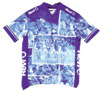
| The total solution
system is perfect for short
run customization of apparel and is currently being used
extensively to print customized Soccer, Basketball, Lacrosse,
and Hockey uniforms as well as Cyclewear, Leotards, Promotional
T-shirts, etc. |
 |
As long as your uniforms
are made from polyester the dye-sublimation process will
work. Several of our customers are currently using the Total
Solution process to print Hockey and Basketball shirts.
We've also found that many owners in the
paintball industry have found the total solution system
ideal for short-run design customizations of uniforms. Jersey's
customized with dye sublimation inks can withstand multiple
washes and still maintain their vibrant colors. |
|
A5. Can I use
total solution package for sublimation onto glass surfaces? |
You can sublimate designs or text onto coated glass. The glass
needs to have a polyester coating and coated glass is commercially
available. Contact us for further details.
|
A6.
How does the dye sublimation process compare to screen printing? |
 |
Banner |
Dye-sublimation print on polyester material does not affect the
hand of the material and is more desirable than screen printing
for Home Furnishing & Wallpaper fabrics and the apparel industry.
In the United States and Canada dye-sublimation printing is very
popular for Window Treatments (curtains & drapes), chair coverings
and sheets and pillow cases. The colors are very vibrant, do not
wash out and the process is less messy than screen printing which
requires messy solvents and dyes.
Sublimation is also very popular with sportswear manufacturers-
many printed uniforms (cyclewear, soccer, basketball and lacross)
on the market today are done via sublimation. Unlike screen printing,
where the ink lays on top of the garment, the sublimation process
produces permanent images that will not crack or fade. Also, sublimation
infuses the image into the thread of the fabric so that is does
not affect the breathability of the garment.
Most athletes prefer sublimated jerseys versus screen printing
jerseys. Screen printing leaves a layer on top of the garment
which affects beathability and the comfort of the athlete.
Dye-sublimation is also cost efficient and very popular for short-run
customization of fabrics. Special logos, pictures and designs
can easily be created or scanned into the computer. Transfer paper
can be generated and custom prints finished in a matter of minutes
as opposed to screen printing which requires lengthy time for
preparation of the stencil and assembly of the mesh fabric.
|
A7. Is dye sublimation
suitable for trade show booth backdrops? |
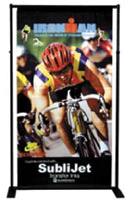
Dye-sublimation is often used to produce trade show booth backdrops,
banners and tabletops. Polyester coated fabric booth backdrops
created using the dye-sublimation process offer a great advantages
over the traditional booth backdrops which use vinyl. These advantages
include:
- Portability - transporting a fabric booth background is easier,
lighter and can result in cost savings on shipping costs.
- Washable - fabric backdrops can be washed or dry cleaned and
tend not to wrinkle as much as vinyl backdrops
- Higher Quality- vinyl backdrops tend to give of glare while
fabric backdrops have a smooth and non-glossy look which is
more suitable for pictures and tv shots.
|
A8. How
does small format sublimation compare to large format sublimation? |
| Small Format Systems |
Large Format Systems |
- Total startup cost between $2,500 to $6,000
|
- Total startup cost between $8000 and $35,000 or greater
|
- Prints widths of 8.5" wide to 17" wide
|
- Print widths of 24" wide to 63" wide
|
- Ideal for entry to mid level businesses looking for an
extremely flexible system.
|
- Ideal solution for businesses with a specific customization
applications that may require short-run productions
|
- Output speeds of up to 120 square feet per hour (laser)
- 30-40 square feet per hour (inkjet)
|
- Output speeds of up to 280 square feet per hour (360 x
540 dpi)
|
Our total solution package is geared towards
large format printers |
A9. What
training is offered through the total solution package? |
Every system is covered by the Partner Plus Program - this program
features: Telephone/Fax/Web Support, Full Product Warranty and
Full Printer Support and Service. [more..]
In addition, Sawgrass offers an comprehensive tech training package
which includes a 2 day onsite training session to help you get
the package installed and operating efficiently. Jesse J Heap
& Son, Inc. can also assist in Heat Press operation and training.
|
A10.
Can the dye sublimation process be used for printing on snowboards? |
Yes, customers have successfully used dye sublimation inks to
sublimate personalized images onto snowboards. The Epson
9800 is well suited for high volume printers as it
allows printing both sides of the board side by side on one sheet
of paper. The ArtainiumUV2+
inks are also recommended due to their strong UV
resistance to fading.
Ensure your snowboard topsheet is suitable for
sublimation - it should contain a polyester blend which allows
the sublimation ink to properly bond.
|
B. Software |
B1. What computer system requirements
are required to run the Wasatch SoftRip TX? |
Minimum Requirements
1 Ghz CPU
128 MB Ram
20 Gigabytes Hard Drive
Windows 2000 or XP
Recommended System Requirements
Pentium IV 3.06 GHz CPU or faster
256 to 512 MB Ram *
80 Gigabyte or larger Hard Drive
Windows 2000 or XP
RAM and CPU speed are the two most important
factors in determining productivity with Wasatch Softrip and our
total solution package. Wasatch Softrip performance is heavily
dependent on the speed of the CPU. For customers with high production
requirements it is recommended to invest in a Pentium IV 3 GHz
or higher in order to gain maximum productivity.
For customers working with larges files (100mb
or greater) we recommend 512 MB RAM or higher.
With today's low RAM prices and its ease of installation, extra
RAM is a wise investment. 1 gigabyte of RAM is ideal in today's
marketplace.
Additionally, for maximum productivity we recommend
using a firewire or USB 2.0 connection between your epson printer
and computer. This would require a firewire or USB 2.0 port -
see our section on the different connections
that the Epson printer support.
|
B2. What Operating
System is suggested to run with the Wasatch SoftRip TX? |
Windows 2000 or XP Operating Systems are REQUIRED.
SoftRIP will not run on a Macintosh.
|
B3. What is
the advantage of using Wasatch SoftRip TX or ErgoSoft with my
Large format printer? |
Before answering this question we need to first
understand what software like Ergosoft Posterprint or Wasatch
Softrip does. RIP (Raster Image Processor) software acts as the
vehicle between your computer and large format printer. It processes
your custom digital images and tells the printer how to organize
your image - i.e. where and how to place each droplet of ink.
Wasatch SoftRIP & Ergosoft Posterprint prints
images much faster then conventional printer drivers. It also
provides advances color management tools to accurately reproduce
selected colors. Wasatch softrip also helps control ink output,
helping prevent ink over-saturation and ultimately saving on
ink costs.
In summary, RIP software like Ergosoft Posterprint
or Wasatch Softrip saves time, produces clearer and more accurate
pictures, provides a superior output without wasted time and
media, and is backed with superior technical support.
For further information on the benefits
of a RIP view
our article on Why RIP?
|
B4. What support
plan is offered with Wasatch SoftRip TX for Textile Printers? |
Wasatch offers 90 days free technical support
with the purchase of their software. This includes:
- Toll free technical support
- Email and Fax Support
- Unconditional 60-day money back guarantee
|
B5.
How does Wasatch Softrip handle creating variable data graphics
(i.e. customized uniforms) |
Creating graphics that require changing text or graphics for
each individual print can be a time consuming process. The total
solution package includes the optional
Variable Data Printing (VDP) from Wasatch. VDP helps solves
this productivity issue by including the ability to create templates
for graphics that will automatically insert text or graphics for
each print. Read more about the Variable
Data Printing option for Sublimation Printing.
This option is ideal for:
- Sportswear Uniform (basketball, hockey, baseball, etc)
- Labels
- Personalized Promotional Materials
|
B6.
What file formats does Wasatch Softrip support? |
Wasatch
RIP software is compatible with the following file formats:
- PostScript Level 3
- EPS
- TIFF
- JPG, GIF
- PNG
- PSD
- MrSID
|
- BMP
- PCX
- PPM
- PCD
- TGA
- DCS2
- PDF
|
|
B7. What
do I need to check to ensure Wasatch is setup for printing? |
- Ensure the QUEUE PROCESSING ACTIVE box in the upper left hand
corner of the main window is checked
- Ensure all physical connections are connected securely
- Make sure the correct printer is chosen from the Setup Menu
|
C. Heat Transfer Presses |
C1. How do I
choose the right Heat Transfer Press? |
Before deciding on which Heat Transfer Press
to choose it is first important to understand the two main types
of Heat Transfer Machinery:
| Type |
Examples |
| Platen Type Transfer Presses |
Astex model #162/354,
1550PA, 1600, more |
| Rotary Drum Transfer
Presses |
Astex model #7500, #7616,
7900T, 7300IJ, more |
| |
|
Platen
presses are often used for printing on individual pieces such
as cut apparel parts, T-shirts, sports apparel, tote bags, etc.
Platen presses are also used to print on rigid substrates such
as wood, metals and ceramic tiles.
Rotary
Drum Transfer Machines are often used to print fabric continuously
(roll to roll) and to print large fabric parts such as signs and
banners which may be too large for a standard platen press. Drum
machines can also be used to print sports apparel and other cut
apparel parts. Drum machines are more productive than platen machines
for sublimation printing on cut apparel parts and are therefore
used when production volume is high. Drum machines are not used
however to print onto rigid substrates such as wood, metal or
ceramic tile.
Choose the right Heat Transfer Printing Press
depends on a number of factors:
1) Types of Product being printed
2) Print Size
3) Production Requirements
If you wish to print full coverage on 60"
wide yard goods a Rotary Drum Heat Transfer machine is required.
T-shirts, mugs, wood or tile are best printed on a platen machine.
Cut apparel parts can be printed on either a platen press or a
rotary drum machine. Production requirements often dictate which
type of machine is used. Banners and soft signage are often printed
on a rotary drum machine.
Use our heat
transfer press search to help narrow your heat transfer
printing choices based on your printing production needs.
Let us know your application
and we will be happy to recommend the right machine for your particular
needs.
See our
Introduction Guide to Heat Transfer Machines for further reading.
|
C2. What's the
difference between a Rotary Drum Heat press verses Platen Heat presses? |
Platen presses are often used for printing on
individual pieces such as cut apparel parts, T-shirts, sports
apparel, tote bags, etc. Platen presses are also used to print
on rigid substrates such as wood, metals and ceramic tiles.
Rotary Drum Heat Presses are often used to print fabric continuously
(roll to roll) and to print large fabric parts such as signs and
banners which may be too large for a standard platen press. Drum
machines can also be used to print sports apparel and other cut
apparel parts. Drum machines are more productive than platen machines
for sublimation printing on cut apparel parts and are therefore
used when production volume is high. Drum machines are not used
however to print onto rigid substrates such as wood, metal or
ceramic tile.
|
C3. What
are the typical life cycles of the heat transfer press heating elements
and how difficult are they to replace? |
The electric heating elements are not very hard to change. The
side of the heat transfer drum opens up and the element cage assembly
slides out. Generally speaking it would take about 3 - 5 hours
or so to pull out the element cage and replace the elements.
How long the elements last depends on how often the machine
is used. Generally speaking we expect elements to last about 3
to 5 years with normal use of 8 hours a day 5 days a week. Elements
(complete set or individual pieces) can be purchased from
us.
|
C4. Are
there any special considerations as to where the machine should
be installed in our production plant? |
We recommend that the machine not be located
right against a wall. Room is needed around the machine for servicing
and for removing of the element cage. Four or five feet off a
wall should be good. You will also want to have room in front
of the machine for loading and in back for unloading. The press
should also be located where there are no noticeable drafts which
can affect its proper operation.
No special venting is required as Dye-sublimation fumes are non
-toxic. However, many but not all of our customers do put a hood
over the machine and vent to the outside.
|
C5. Which
heat transfer presses are capable of adhering a high vision reflective
strip to clothing? |
Reflective tape is often attached to garments with a platen type
heat transfer press. The following machines are typically used
in this process:
|
C6.
Which heat transfer machines are best suited for printing on t-shirts? |
For T-shirt printing we recommend the following machines:
- ELI-600 Manual 16" X 20" swing away press with interchangeable
platens and an optional cap attachment
- EL-800 Manual 20" X 28" transfer
machine with front load reciprocating sliding drawer.
- 1350PM 16" X
20" air operates swing away with two button close.
- 1550PA 16" X
20" foot pedal operated model with dual bottom platens
All our Heat presses are industrial grade and
have 220 volt single phase electrical requirements except the
#ELI-600 which is 120 vold. All heat presses have digital time
and temperature controls. For further information check our heat
press finder to find all presses
suited for t-shirt printing.
|
C7. What
are the advantages of using a rotary Drum Heat Transfer Press? |
Rotary Drum Heat Presses are typically more efficient then their
platen counterparts. These types of presses eliminate the need
for registration marks and garment templates. The garment parts
- fronts, backs sleeves can be cut in quantity. The paper is printed
in a roll and fed into the machine with the graphic facing up.
The cut parts are placed down onto the paper as it is fed into
the machine. This is a much more efficient way to run the work.
These advantages make Rotary Drum Presses ideal for production
factories looking to operate efficiently in a lean manufactuering
environment.
|
C8. What
sort of service do you offer for the heat transfer presses? Are
replacement parts readily available? |
We have been selling and
servicing Astex's line of Heat Transfer presses for 25 years.
We offer phone and email support and if necessary can supply on-site
technicians for servicing. We also carry spare parts for all our
machines and with 25 years experience there aren't many problems
we haven't already seen. |
C9. Which
heat presses do you recommend for sublimation printing for cyclewear? |
The following machines are more often used to print cycle wear.
The printed paper with the various parts of the cycle shirt (front
, back and sleeves) is layed down on the heat press input conveyor
with the printed graphic facing up. The various cut parts (front,
back sleeve) are placed onto the paper and the whole sheet is
fed into the machine. The transfer paper and printed parts are
separated automatically and the finished printed parts exit out
the back of the machine.
|
C10.
I sublimate images on tote bags - which press is suitable for my
business? |
The heat press recommendation realy depends on
your production load and specifications. Generally speaking for
low production rates we recommend the Model
#1330M which can handle a printing up to 16"
X 20". For high volume sublimation runs take a look at our
dual
platen #1550-PA.
|
C12.
I want to print onto poly-lycra but I'm concerned about stretching
the goods too much when they pass through the heat press? |
We have customers successfully running lycra
without any stretching- the 7360IJ
is well-suited for this application. It should be noted however,
that there is some operator skill involved in the process. Stretching
of goods can be caused by drum speed pulling and the resistance
of the cluth on the re-winder being too strong. A skilled operator
can recognize these problems and adjust accordingly.
We also will offer to run samples at our shop
through the heat press to ensure quality results.
|
D. Ink Jet Printers |
D1. What are
the advantages of Epson's Piezo Printheads? |
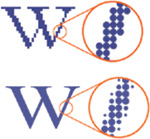
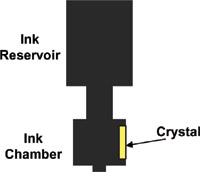
Epsons Piezo electric printheads are well-suited for reproducing
photographs. They are specially designed to vary the size of the
ink droplet to produce a more photo-realistic image. Additionally,
unlike other inkjet printers, the Piezo electric printheads do
not require heat activation.
Epson Piezo electric printhead are equipped in Epson's
large format line of prints and Mimaki's JV4 printer series.
 |
|
Piezo Electric Print heads
vary the size of the ink droplet. |
|
D2. What are
the main differences between the Epson 9600 & Epson 7600? |
The major difference between
the Epson 7600 & Epson 9600 are their paper sizes. The Epson
7600 has a maximum paper width of 24" while the Epson 9600
has a maximum paper width of 44".
The differences in paper
width also translate into differences in sizes. The Epson 7600
dimensions are 43.3"(W) x 22"(H) x 22.5"(D) while
the Epson 9600 is 63.9"(W) x 46.4"(H) x 28.2"(D).
The Epson 9600 also includes
an optional automatic take-up reel for long unattended print runs.
This accessory is not available for the Epson 7600.
|
D3.
What are the print speeds for the Epson 7600 and Epson 9600? |
The print speed will vary
depending on the print mode being used. The variation ranges from
8 ft2/hr to a maximum of 192 ft2/hr.
"Production quality"
prints are ~ 87 ft2/hr.
"Better then photo lab
quality" prints are ~16ft2/hr
|
D4.
Will the Epson Printer Software properly monitor ink levels when
the Sawgrass Inks cartridges are installed? |
Yes. When the sawgrass ink cartridges are installed you will
get all the same functionality as you would with normal ink cartridges.
This includes the ability to monitor your ink levels with the
Epson Software.
|
D5.
What print speeds can be expected for the Mimaki JV4 Printers(JV4-130,
JV4-160 & JV4-180)? |
There are several different factors that affect print speeds
- the most important is the printers configuration settings. Below
we list Mimaki's manufacturer's rate speed in square feet per
hour for all printer models:
| DPI |
Printer Mode |
Square Feet Per Hour Output |
| 360 x 360 |
Standard |
252 |
| 360 x 540 |
Standard |
178 |
| 360 x 720 |
Standard |
138 |
| 720 x 720 |
Standard |
100 |
| 1440 x 720 |
Standard |
100 |
| 1440 x 1440 |
Standard |
26 |
|
D6. Can
I switch between dye sublimation inks and regular inks using my
epson printer? |
It's not recommended to switch continuously between dye sublimation
inks and regular inks - most dye sublimation printers have a printer
dedicated to sublimation printing. Notwithstanding, it is possible
to switch between regular inks and sawgrass dye sublimation inks.
When switching, it's important to perform cleaning maintenance
between the ink changeover. Refer to your epson manual for cleaning
procedures.
|
D7. What
connections do the Epson Printers support and which one do you recommend
using? |
The EPSON 7600 and 9600 support 4 different connections - firewire,
usb, ethernet, and parallel, while the Epson 7800 and 9800 supports
firewire, usb and ehternet. Most cases USB connection is suitable
for most of our customers. Firewire and Ethernet connections are
optional connections that incur additional costs.
For a detailed explanation of each connection interface and our
recommendations see our epson
connections detail section.
|
D8. What
maintenance procedures are recommended for my Epson Printer? |
It's important that you protect your ink delivery system from
dirt, air and other foreign objects:
- Keep the covered closed if you are using cartridges
- Regular nozzle checks. We recommend setting a regular
schedule.
- Clean paper delivery system
- Check expiration date of ink
- Store your printer in a low humidity environment.
We cannot stress this enough. Customers have experience
clogging and banding when trying to print in factories
without proper temperature controls.
Recommended Temperatures:
Supported Operating Conditions: 65 -
80°F with 40 - 60% relative humidity
Optimal Operating Conditions: 68-75 °F
with 45- 50% relative humidity
|
Ink Head |
|
D9. How
can I increase the drying time of my prints? |
Some customers, especially those printing with
the Mimaki JV4 have found the need for a faster way to dry ink
for greater production efficiency. We offer a infrared
inkjet dryer which is designed to quickly dry the ink as soon
as it exits the printer.
|
D10. What
printers are supported by Sawgrass's Sublijet and Artainium brand
inks? |
- Epson 7000/9000
- Epson 7600/9600
- Epson 7800/9800
- Mimaki JV4
- Roland Hi-Fi Jet Pro
- Roland Pro II
|
E. Sublimation Inks |
E1. What type
of paper is recommended to use with the Epson 7600/9600 and Sublijet
transfer inks? |
Quality sublimation paper is an important part of producing a
quality end product. Not all paper is created equally. Sawgrass
Technologies has tested their ink on a variety of large format
roll paper and they recommend TexPrintXP
Paper . The paper is available from widths of 24" to
96" and lengths of 110ft to 250ft per roll.
The paper is recommended for use with Epson, Roland, Mutoh, and
Mimaki line of large format printers.
PAPER TIP: It's important to keep your transfer
paper in a low humidity environment. We recommend keeping the
paper in its original packaging until it's ready for printing.
PRINTER TIP: The Epson printers offer much improved
full coverage printing capabilities versus their predecessors.
Nevertheless it's usually prudent to figure that whatever page
size you use it will have 1/4" unprintable area on all sides.
|
E2. What are
the supported substrates/materials that Sublijet Sublimation Inks
can be used on? |
Sublijet digital transfer
inks can be used on a wide range of substrates. Sublijet has the
capacity to print onto any polyester coated surface that can withstand
pressure of 40 psi and a temperature of approximately 400°F
(220C). These substrates include fabric, wood, ceramic, carpets,
metal, plastic, and more.
See sublimation
tips section for more information on substrate preparation.
|
| |
E3.
What ink cartridge sizes are available for Sublijet digital transfer
inks when equipped with the Epson 7600 or 9600 printers? |
Sublijet digital transfer inks are available
in 220ml size for the Epson Style Pro 9600 and 7600.
An
approved Bulk Refill System is also available for the Epson
7600/9600, Epson 7800/9800 and Mimaki JV4. Bulk ink systems
reduce costs,
provide stable ink flow for long run operation, and are refillable
while printer is in use.
|
E4. How do Sublijet
Inks work? |
Sublijet digital transfer inks for ink jet printers
use specially formulated heat-sensitive inks that are patented
by Sawgrass Technologies.
Sublijet inks are used in a two step process.
The inks are first transferred in a non-sublimated (or inactive)
state to standard paper using a compatible Epson Stylus printer.
Then, using a heat transfer press, the printed image is heat transferred
(sublimated) to the final substrate.
Unlike traditional dye sub transfers, Sublijet
inks produce a "first generation" print. A "first
generation" print means the inks are only sublimated
once during the process. Traditional dye sub transfers must perform
two sublimations in order to transfer the image to the final substrate.
The first sublimation occurs when the image is transferred to
special heat transfer paper using a dye sub printer. The printed
image is then re-sublimated to penetrate the final substrate.
These prints are termed "second generation" prints.
"First generation" prints are
advantageous in that they produce a more vibrant, photo quality
image for use on a wider range of substrates than "second
generation" prints offer.
|
E5.
Can I use sublimation inks on darker substrates/materials? |
Sublimations inks generally do not transfer well to darker
type materials. Sublimation inks use dye to permeate the material
and typically transfer better to lighter colored materials.
|
E6. Will sublimation
work on cotton surfaces? |
The sublimation inks
are designed to bond to any polymer coated material, and will NOT
bond to cotton surfaces. There are polymer sprays available that
allow sublimations inks to work with cotton t-shirts, but they typically
work best on shirts that are a mix of polyester and cotton. |
E7. How can
I figure out how much ink I will need for my production requirements? |
Jesse J. Heap & Son, Inc can give you an estimate on ink
usage with the following information:
- Length and Width of item that will be printed on
- Number of items planned to print per week
With this information we can give you a detailed estimate of
ink consumption, recommended heat press size, and printer model
recommendation. Furthermore, we can give you an estimate on how
much money you'd save
by using our bulk ink system for ink delivery versus traditional
cartridge ink delivery.
|
E8. How do I
setup the 'Long life' bulk ink system? |
Details on setting up your bulk ink system for the Epson 7600/9600
are available in our bulk
ink instructions section.
|
E9.
Can I sublimate on blended fabric with polyester and cotton? How
much polyester is required? |
We are often asked this question from clients in the home furnishing
industry as they often require to sublimate onto furniture with
fabric that is part polyester and cotton. Generally speaking,
the higher the percentage of polyester in the fabric the better
the sublimation results. At minimum we recommend a
blend of 60% polyester - or in other words the majority
of the fabric should include polyester.
|
E10.
How much area does one liter of ink cover? |
Approximately 1000 square feet, however keep in mind results
may vary depending on RIP software, printer configuration settings
and ink coverage area.
To estimate bulk ink costs use our bulk
ink calculator which will help quantify your ink savings when
switching from a cartridge based delivery system to a bulk ink
system.
|
E11.
How resistant are the sublimation inks to UV fading? |
Like any decorated products, direct sunlight will cause sublimated
products to fade over time. Factors that affect fading are temperature
and weather - for example an area with more direct sunlight and
dry, arid conditions will probably contribute to faster fading.
With that being said, the ArTainium2UV+ inks are specially designed
for longer UV resistance. The inks greater resistance is partly
due to the inks formulation process which produces higher density
of dyes then typical ink manufacturers. This formulation also
produces more vibrant color output - read more in sublimation
ink section.
|
F. Wide Format Digital
Dryer |
F1.How should
I position the heater in relation to the printer? |
Generally speaking, we have found that placing the dryer heating
element approximately 3" to 4" away from the printer
to ensure optimal operation. The heating element should be parallel
with the substrate. You can use the lever clamps on the heater
head and upright mast to adjust the dryer to its optimal location.
Important: Ensure the media is does not come into contact with
the heating element.
|
F2. How do
I determine what level to set the heater at for my substrates? |
The digital dryer heater has a "power stat" controller
which adjusts the intensity of the heat. Depending on the printer
speed, type of media, room conditions (especially humidity) and
ink saturation levels, the power stat controller will need to
be adjusted.
We recommend running some test runs to find your optimal settings.Once
your optimal settings have been determined, it helps to create
a quick reference chart nearby your work environment for operators
reference.
|
F3. I use heat
sensitive substrates, how can I regulate the heat output of the
digital dryer? |
The digital ink dryer includes
an optional auto shut-off. The Auto Shut Off monitors the temperature
of the substrate and will turn off the dryer when the temperature
reaches a high temperature set by the operator.
|
F4.
What is the maximum heat output from the digital ink dryer? |
The element face of the Digi Dri can reach 375 degrees F. The
measured temperature at the back side of the substrate, when the
dryer is 4" from the face, is less than 168 degrees F.
|
| Epson, Epson Stylus and Micro Piezo
are registered trademarks of Seiko Epson Coporation. All other product
brand names are trademarks and/or registered trademarks of their respective
companies. Jesse J. Heap & Son disclaims any and all rights to
these marks. |


 Print
Print