

Setting up a Summary Cart on Your Site with PHP
|
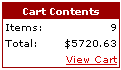
Using Mals ecommerce shopping cart in combination with some PHP and HTML it’s possible to integrate a cart summary information box into your site.
This cart summary box could display the current state of the customers order as they browse through your store and would be updated everytime the user adds an additional item using mals shopping cart. This can be accomplished several ways. This article will explain an approach using PHP and cookies. STEP 1.We first need to enable the continue shopping button in the cart setup to include all cart content variables. This option will pass back the necessary information to populate your cart summary box. This feature is available under the Button Styles and Behavior section. Click the checkbox titled "Append cart content vars". This option will append all necessary shopping cart information for you to display in your cart content box. These fields include:
STEP 2.We now have access to all the major cart information. Using PHP we will extract the necessary data and display it in our cart summary box. Depending on how your cart is setup, this information will be passed back using either POST or GET. For this example we will assume the POST method is enabled. Accessing POST data in PHP is fairly straightforward: $tot = "$" . $_POST[‘tot’]; // We append $ to the total from mals and store it in
$tot$qty = number_format($_POST[‘qty’],0); //Number format is used to display qty in whole number format For this example we will use the ‘qty’ variable and ‘tot’ to display the Total number of items the user has in his cart and the total dollar value of these items. Once we have the data stored in variables we can use the echo command to display them in the appropriate html rows: <!- Cart Code ->
<table> <tr> <th>Cart Contents<</th> </tr> <tr> ?> <td align="right"><?php <!- End Cart Code -> STEP 3.Unfortunately there are several problems with the above code. The web is a stateless environment - each http request does not have any knowledge about the data in the previous request. So assuming our online store has multiple pages we’ll need a method of persisting the cart information so we can display the cart contents on each page of our online store. One option for saving data is using COOKIES. PHP can create cookies though the setcookie function, and the $_COOKIE syntax can be used to read cookies. Cookies need to be set before any header information is set. This means they must be located at the top of your page before any HTML or whitespace. For each page of our online store we’ll add the following code at the top of each page: <?php
if (isset($_POST[‘qty’])) { setcookie("qty", $_POST[‘qty’]); setcookie("tot", $_POST[‘tot’]); } ?> The above code checks to see if the POST[‘qty’] variable contains any data. If it does the code sets two cookies called qty and tot. These cookies contain the data that is passed in from $_POST[‘qty’] and $_POST[‘tot’]. Note: If you have multiple pages within your store it would be easier to store this code in a seperate file and use the PHP include command at the top of each page. STEP 4.Now there is one more caveat about Cookies. Cookies data values will not be available until the page is reloaded. This isn’t a problem for us though. We already have the data available in the $_POST variable. We only need to use the cookies on each successive page load. This will require a slight modification of our cart contents code: snip…
<?php //Check to see if the $_POST qty has data. If it has data we want to use it to display the cart contents information. if (isset($_POST[‘qty’])) { STEP 5Now we are almost done. There is one more issue we need to contend with. What happens when a user completes a purchase and decides to use the RETURN TO STORE link to possibly make another purchase? The ‘return to link’ is a hyperlink which does not include the cart content variables that we enabled in STEP 1. We need a way to figure out the user has completed a purchase and properly reset our cart summary contents. One method is to pass a unique variable in the return to link. In the ‘return to link’ section under cart setup enter the following return to link: <a href="#">www.yousite/store/index.php?resetcart=1</a>
Now we have to modify our header code we set in STEP 3: <?php
// Default resetCart variable to NO$resetCart="no"; if (isset($_GET[‘resetcart’])) { // If the resetcart variable is set that means the user has completed an order. We need to ZERO out the cart content. setcookie ("qty", 0); setcookie ("tot", 0); $resetCart="yes" // This variable will be used later when printing out the cart contents</span> } STEP 6There is one last problem. The cookie we set in step 5 will not become active until the page is reloaded. To get around this we will create a variable called resetCart to track when the cart needs to be reset. We’ll add an additional check to our cart contents code from Step 4: snip…<?php
//Check to see if the $_POSTqty has data. If it has data we want to use it to display the cart contents information.</span> if (isset($_POST[‘qty’])) { //If the $_POST var does not have data let’s check to see if the $_COOKIE qty has data. Complete Script Example Note: as noted by Joe Freejoy, when copyin this script one MUST change all the single “curly†quote marks to regular “apostrophe†marks. <?php
$resetCart="no"; if (isset($_GET[‘r’])) { setcookie ("qty", 0); setcookie ("tot", 0); $resetCart="yes"; } elseif (isset($_POST[‘qty’])) { setcookie("qty", $_POST[‘qty’]); setcookie("tot", $_POST[‘tot’]); } ?> Script Limitations
The End.That’s it. Your done. To see our live store in action go to our sublimation store. If you have any questions you can email me and I’ll try to help - projects at jesseheap dot com. About the AuthorJesse Heap maintains several different websites as a hobby including his recent favorite Pastry Site which includes some fantastic pictures of unique and creative wedding cakes. |
November 29th, 2006 at 7:11 pm
Had a few questions for you. I can follow what and understand what you have written, but I’m not sure where to exactly place the code? If you could give me an example source code with everything working, that would help out greatly. Thanks
November 30th, 2006 at 6:37 pm
Pic - I added an example with the complete code above
December 8th, 2006 at 7:56 pm
I have tried your script and cant seem to get it to work.My server supports php.It seems to work ok when I replace “”> with a return to the same page but it doesnt show any amounts apart from zeros in the cart display box.Can you help please?
December 12th, 2006 at 6:49 am
Thanks alot, that helps out tremendously. Thanks again for your fast response.
December 14th, 2006 at 5:03 am
Looking over your script and beginning to understand it. A few questions
1. The line “> is obviously sending $returnurl to Mal’s. What exactly does it unless it is just to return to the page you came from?
2. What does the . do in $tot = “$” . $_POST[‘tot’]? (Probably silly question I know)
December 20th, 2006 at 3:27 pm
Tim - I believe you are referring to this line:
Yes it just sends the url of the page to Mals. This url is used when the user clicks on Continue Shopping so that they can return to the page they came from.
2. The . appends the $ to the total number so it appears as $200.00. There is probably a format function in PHP to display as currency. This would be the “correct” way to display currency. The approach works, but not best practice.
January 1st, 2007 at 3:18 am
Hi,
Your Cart summary Box, would be great on my web site.
Unfortunately, the code is all gibberish to me, I don’t understand it at all, (even though your explananations look very comprehensive).
I wondered if you had a “Product” that I could buy to enable me to impliment the Cart Summary Box on my site without getting my hands dirty.
Regards,
Paul
Sorry Paul I do not have any such product. I’m sure you could find something on Google though.
January 8th, 2007 at 6:52 am
Ok, I’m understanding this a little better now, I’m thinking every button on every page has to be included in this new code you have made. Is there something more simple and less time consuming those of us that already have the shopping cart codes? Something we can add to our already existing code?
Terri - the php code is not directly associated with the BUY NOW buttons. Every buy now button needs hidden fields set, but that’s a requirement of Mals-e. The php code that I put together goes in the header of each page. See the demo and the last step which shows the entire code layed out.
February 5th, 2007 at 3:03 pm
In step 5 you note that we must add the following to the cart setup.
http://www.yousite/store/index.php?resetcart=1
All seems ok except for the index.php. What and/or where is index.php?
index.php should be your main page. See http://www.jesseheap.com/store
March 31st, 2007 at 6:19 am
Reading from step three … Note: If you have multiple pages within your store it would be easier to store this code in a seperate file and use the PHP include command at the top of each page. Where should this file reside, could you give an example of how it should be named, and please tell me what the PHP include command should look like and does it go into each pages header?
Dave
The include file could reside anywhere under your root folder. So in other words you could simply store it in your root folder or create another folder called includeFiles and store it there. If you were to store it in your root of your site, the command would look like:
< ?php include ("yourheaderfilename.php");?>You would place this at the top of your page.
Hope this helps.
Jesse
April 10th, 2007 at 9:31 am
Hi Jesse,
Do you accept payments to install this script on my website for me? (or at least work through it with me step-by-step via email).
This is a feature that I greatly want and just can’t get the hang of even though I have very good HTML knowledge.
Shona
Shona - I accept links to http://www.pinkcakebox.com in return for help. Contact me for more information
September 20th, 2007 at 4:45 am
Gudday Jesse
I have had another go at your code.
1. The little box for the cart loads ok and I can begin to order items however the items line and the total line stay blank. When I press the View Cart link (in the box) it takes me to my cart but then I am stuck there, I cannot return to my site. The URL in this case is given below.
http://ww8.aitsafe.com/cf/review.cfm?userid=XXXXXXX&return=
The %20 appear to be extraneous (to me at least).
If I don’t use the View Cart button the orders go through ok.
2. I am also curious as to the last presence of the code fragment
that appears to be outside the rest of the code.
I am only using the one page on the site at the moment - http://www.petalsandpatches.com/bears_viewcart.htm
Hope fully I am doing something wrong that is easy to fix.
I have made the necessary change on my Mal’s site that you mention. I am using my own custom buttoms instead of the Mal’s default form buttons, hopefully that is not an issue. I kept the Hyperlink form radio button selected.
November 29th, 2007 at 10:24 am
Tim, I think because the code has been copied directly from this page the quotations are not correct, esp. if your using dreamweaver.
$returnurl=$_SERVER[‘SERVER_NAME’] . $_SERVER[‘PHP_SELF’];
You need to manually change the ” ‘ ” marks in dreamweaver in all the php markup otherwise the php does not parse correctly.
March 6th, 2008 at 3:08 am
Hi
Since this article was written has there been a work around created for the situation where people are clicking on the back button whilst in the cart?
Thanks, Paul
Paul - not that I know of
May 25th, 2008 at 6:13 pm
UPDATE!
After searching and searching I found the trouble with this script. One MUST change all the single “curly” quote marks to regular “apostrophe” marks. Works beautifully then.
Thank you Jesse!
May 26th, 2008 at 3:51 am
Thanks for the update Joe - I’m glad it worked out for you. I know you spent a good amount of time trying to get this to work. I’ve noted your comment in the post above so it doesn’t happen to anyone else.