

WordPress Plugin: PHPList Comment Subscriber
This wordpress plugin allows users to be optionally subscribed to your newsletter when adding comments to your blog. It requires PHPLIST newsletter manager to work.
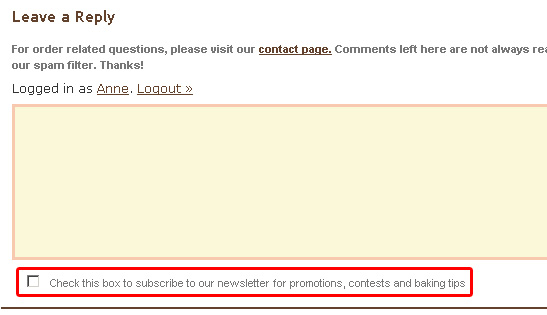
It adds a checkbox as shown below, which gives the user the option of automatically being subscribed to your PHPLIST managed newsletter:
Pre-requisites
- WordPress 2.0 (tested up to WP 3.1)
- Phplist 2.10.2 or greater. (The plug-in may work with previous versions prior to 2.10.2 - let me know)
- PHP 4.x with cURL support (Users have confirmed it also works in PHP 5.x)
Download
Current version of WordPress PHPList Comment Subscriber plug-in is 1.0
wp-phplist-subscriber.zip
Quick Start Instructions
- Download plugin installation and upload phplist-comment-subscriber.php to your plug-ins folder, usually /wp-content/plugins
- Login to wordpress administration panel and activate the plug-in (Under plug-ins). Plugin name is phplist comments.
- Navigate to Options -> PHPList and fill in the General Settings and Form configuration as instructed.
Change Log
.1
- Initial Version
.2
- Checks to see if comment has been marked as spam before adding it to PHPLIST. This ensures that comments identified as spam by anti-spam plugins like Akismet are not added to PHPLIST
1.0
- Prior version had a function that was inadvertenly using a function from another one of my plugins. So basically if you weren’t using my other PHPList plugin, this plugin would break. I broke the dependency, and this plugin now works independently of the other.
Demo
See plugin in action at Pink Cake Box Wedding Cake Blog
Frequently Asked Questions
Can you explain the form settings?
The form setting options look like the following:
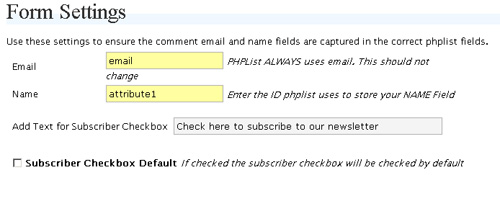
The first two options are required to ensure the fields from the comment form get captured in the correct fields in PHPLIST. The first field attribute “email” is always “email”, you shouldn’t have to change this. The second field attribute for “Name” needs to be looked up within phplist admin. Read below for instructions on how to do this.
Each attribute in PHPList takes the form ‘attribute[X]’ where X is a integer. To determine the corresponding integer go to the Active Subscriber Page within PHPList - http://www.yoursitename.com/lists/admin/?page=spage. Locate the active subscriber page and click edit. Once the subscriber page loads, locate the attribute you are using and find its number:
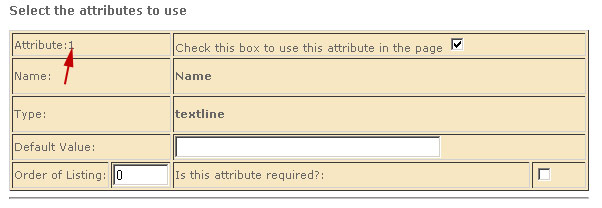
So in this example, since the attribute is assigned a value of one, you need to enter attribute1 in the textbox for Name.
The next textbox field in the Form Settings section asks for the text to display next to the checkbox on the comment form. Example - “Check here to subscribe to our newsletter”
And finally, if you want the subscriber checkbox on the comment form to be checked by default, check the last checkbox in the form settings options page.
How do I configure the General Settings section?
We already have instructions up in our installation section for PHPLIST subscriber form plugin. See the instructions here
Donations (Link to us)
If you use this script and find it worthwhile please link back to our main site. While we enjoy releasing scripts to the general community, we also look to benefit by drawing more traffic to our site. Feel free to link back however you want - here is a guideline:
J J. Heap & Son - Manufacturers and distributors of a wide variety of labor saving devices and factory automation technologies including dye sublimation equipment, Heat transfer machines, Fusing Machines, So-Fast Cutting Equipment, Material Handling Equipment and an inventory of rebuilt machines.
January 17th, 2007 at 11:04 am
Great integration!!!
Just one question. I am using just email field in my PHPlist as required…
will your plugin work because I don’t collect NAME field?
Again…great effort!
AlainS: It should work fine. Leave it blank in the options panel. Let me know if you have any problems. I should make it clearer that that field is optional
April 26th, 2008 at 8:29 am
Will this work for wordpress 2.5?
April 26th, 2008 at 8:40 am
Pandking - Yes this works in WP 2.5
January 29th, 2009 at 1:51 pm
In regard to the comment above I’ve now released a WordPress PHPList Dual Reigstration Plugin which basically mimics your plugin but does away with cURL (I had a couple of problems with it) and of course works on the registration page rather than comments.
Just wanted to say thanks =]
July 22nd, 2009 at 8:28 pm
I was wondering how I missed this plugin. I got ahold of the PHPList Form Integration plugin a few months ago and made it work beautifully.
Now this? Perfect! Gotta try it now.
April 9th, 2011 at 8:24 am
I’m having some trouble with this plug-in. It does not appear as described when viewed in IE or Firefox. If you could drop me an email, I’d appreciate it.
April 9th, 2011 at 12:36 pm
Hi cristy - You need to ensure you have phplist installed in order to use this plugin. That’s always the first thing to confirm.