|
PHPList is a excellent open source newsletter manager. However, one missing piece from the application is the ability to cleanly and easily allow users to subscribe to your newsletter from your wordpress blog.
 |
|
Example PHPList Form embedded in WordPress
|
|
|
|
Code Required to Display
Form
|
This lightweight plugin for WordPress 2.0 to 2.9 gives you the ability to easily allow users to subscribe to your newsletter or RSS blog feed from any page on your blog. Simply install the plug-in, configure your settings, and embed the comment <!--phplist form--> on any page on your blog. It’s easy and fast and does not require any further template modifications in PHPList or WordPress.
Table of Contents
- Pre-requisites
- Download
- Quick Start Installation Instructions
- Detailed Installation Instructions
- Screencast - configuration
of plugin
- Demo
- Contact
- Change Log
- Credits
- Future Enhancements
- Donations (Link to us)
Pre-requisites
- WordPress 2.0.x to 3.1
- Phplist 2.10.2 or greater.
- PHP 4.x or 5.x with cURL support
Download
Current version of WordPress PHPList Integration plug-in is 1.7
Quick Start Instructions
- Download plugin installation and upload phplist.php and phplist.cssto your plug-ins folder, usually /wp-content/plugins
- Login to wordpress administration panel and activate the plug-in (Under plug-ins). Plugin name is phplist.
- Navigate to Options -> PHPList and fill in the General Settings configuration as instructed. (Optionally, you can configure the form settings as well - see detailed instructions for information)
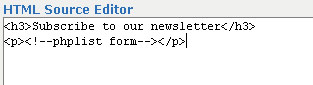
- The last step is to setup the form. If you are adding the subscriber form directly to any post or wordpress page then just add the following comment while inside the wordpress editor:
<!--phplist form-->
For more advanced users, who are comfortable editing template files, the form can also be added to any template file. For example most users like to display the subscriber form in their sidebar.php. To do this open up the template page (i.e. sidebar.php) and add the following code:
<?php
            $content = apply_filters('the_content', '<!--phplist form-->');
            echo $content;?>
Detailed Installation Instructions
- Download the ZIP installation file, and upload phplist.php and phplist.css to your plug-ins folder ( /wp-content/plugins)
- Login to wordpress administration panel and activate the plug-in (Under plug-ins). Plugin name is phplist.
- Click on Options -> PHPlist to configure PHPList

- Settings are divided up into General Settings and Form Settings. Starting with General settings, set the following:
- PHPList URL: Set this to the url of base installation of the domain where you are hosting PHPList. If the installation folder is password protected then the format of the url should be:
http://username:password@yoursite.com/lists/

- PHPList Admin Login: Enter the user name of the PHPList Admin.
The user/pass of the admin is needed in order to optionally bypass the need to confirm the user.

- PHPList Admin Password: Enter the password of the PHPList Admin.

- PHPList List Information: In this table enter the number (i.e. PHPList ID) and name of the mailing list you want to subscribe the user too. The name of the list can be whatever you want - it will be displayed on the form in the case when you have more then one list added.

NOTE: To figure out the correct number (i.e. PHPList ID) for your mailing list, login to PHPList admin and click on Lists for a current list of lists. (http://www.yoursite.com/lists/admin/?page=list) Each list is assigned a number which should be entered in this List ID field. See example below
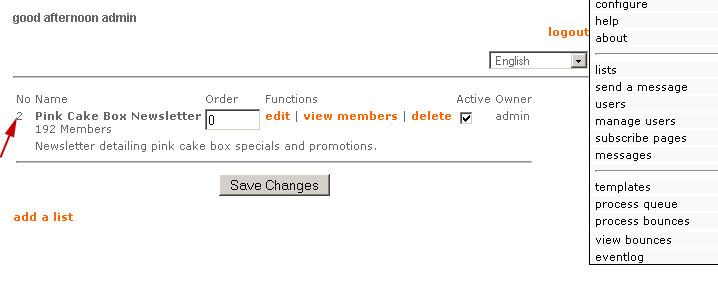
Note: If you want to give the user the option of subscribing to multiple lists click on the "Add Another List" button to add another row:

If you have multiple lists configured the form would look similar to this:
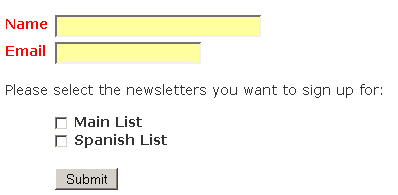
- Skip Confirmation Email: Check this option to
automatically confirm the user without the need for a confirmation
email.
- The Form Settings shows the two fields available for the subscribe form. The optional first row is modifiable and allows you to enter any type of text field required. Ideally it should correspond with a field you are already capturing through the PHPList Subscriber Page.
- Show on Form: Check this option to show the Optional Field on the subscriber form.
- Text Label Name: Enter the label of the field that you want to appear on the subscriber form.
- Text Field ID: In order to successfully write the field value to the correct value in the PHPList database you have to get the ID of the field from PHPList. Each attribute in PHP takes the form ‘attribute[X]’ where X is a integer. To determine the corresponding integer go to the Active Subscriber Page within PHPList - http://www.yoursitename.com/lists/admin/?page=spage. Locate the active subscriber page and click edit. Once the subscriber page loads, locate the attribute you are using and find its number:
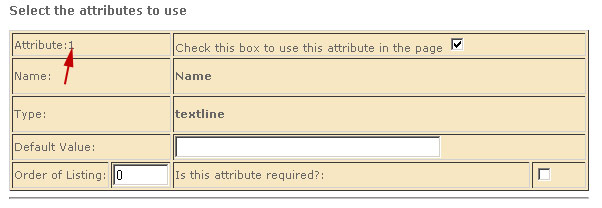

- Text Field Size: Enter the size of the text field box
- Text Field Max Size: Enter the maximum size of the text entered by the user
- Required Field: Check this box if the field should be required.
- Now that the form has been customized, open up any post or page using the wordpress editor and add the following comment to enable the subscriber form:
<!--phplist form-->
For more advanced users, who are comfortable editing wordpress template files, the form can also be added to any wordpress template file. For example most users like to display the subscriber form in their sidebar.php. To do this open up the template page (i.e. sidebar.php) and add the following code:
<?php
            $content = apply_filters('the_content', '<!--phplist form-->');
            echo $content;?>
This code should be positioned in the location where you want the form to appear. Typically, you should make sure to include it within the main <DIV> tags for the form.
Edit the css in phplist.css to customize the look and feel of the form
Note: For advanced users wishing to add additional fields to their form (beyond the two that are provided) see my post on adding additional fields.
Troubleshooting
Question:The plugin is not submitting the user information to the database. Why?
Answer: Steve James comment has helped a lot of people with this issue. Here it is:
For anyone who has everything set up, but the plugin does not actually submit to the database, make sure of one thing. Remember, whatever REQUIRED fields you have in a PHPList “subscribe page†needs to be mimicked in the plugin.
I made the mistake of requiring a name, city and state in my “subscribe page†in PHPList but only required the name in the plugin. The result was that the plugin appeared to submit the data but it never made it to the database because of the “required fields†not matching between PHPList and the plugin.
Demo
See demo at bottom of this post.
Contact
I do not provide support for this plugin. From time to time I will respond to comments. Read comments below for common issues with plugin
Change Log
Version 1.0 - Initial Version
Version 1.01 - Added check to ensure user has entered trailing slash for the PHPList URL. If no trailing slash is found, the slash is appended to the end of the URL.
Version 1.02 (10/8/2006) - Minor tweak to support displaying subscriber form in any template page.
Version 1.2 (1/13/2007) - Changed way script stores options to prevent clashes with other plugins. Moved CSS to seperate file - phplist.css. CSS can now be toggled on or off
Version 1.3 (1/28/2007) - Fixed form display problem in WP 2.1. Full compatibly with WP 2.1
Version 1.4 (10/22/2007) - Fixed X S S vulnerability. Thanks to Gordon for the find.
Version 1.5 (3/16/2008) - Now with multiple list support!
Version 1.6 (7/18/2009) - Now with widget support (FINALLY). Thanks to Rob Z at Web Geek Blog
Version 1.7 (11/21/2009) - Now with Internationalization Support (French & English). Thanks to Le Foie gras
Credits
Credits to Ryan Duff, creator of WordPress Contact form plug-in, for some of the base code I used for detecting spam and the flexible design idea for dropping the subscriber form on any wordpress page.
Future Enhancements
- Currently, this version only supports a simple subscriber form which supports an email and one optional text field. In the future, I’ll look to add support for multiple fields. Ideally, the plugin could interface directly with PHPList and grab the form structure.
- Take a class based approach to facilitate future enhancements
- Explore using wordpress widgets for displaying subscriber form
Donations (Link to us)
If you use this script and find it worthwhile please link back to our main site. While we enjoy releasing scripts to the general community, we also look to benefit by drawing more traffic to our site. Feel free to link back however you want - here is a guideline:
J J. Heap & Son - Manufacturers and distributors of a wide variety of labor saving devices and factory automation technologies including dye sublimation equipment, Heat transfer machines, Fusing Machines, So-Fast Cutting Equipment, Material Handling Equipment and an inventory of rebuilt machines.
|


December 7th, 2006 at 2:45 pm
Jesse,
I installed your plugin last night. Looks great, except when I try to subscribe to my own newsletter (using a fresh email address), it doesn’t add the new address to my phpList “users” group. Nor does it send me a confirmation email. Can you help?
Nick -
It appears your list id is 2. Ensure the list id is setup correctly in the phplist admin options. See http://projects.jesseheap.com/all-projects/wordpress-plugin-phplist-form-integration/#ListID for more information
Jesse
December 9th, 2006 at 10:27 pm
Note: This script requires PHPLIST which by default is stored in /lists under your web root.
Hi,
Nice plugin. But, I don’t know where goes the list. Should I create manually the folder /lists/ ?
Thanks
Urus
December 22nd, 2006 at 1:52 am
Note: This user had 3 required fields in his phplist form. Out of the box the script only supports 2 required fields. See this post on how to add additional fields.
Hi Jesse, great plugin, but I’m having the same problem as Nick, above. The plugin goes in perfectly, the user fills out the form and is returned a success message, but the user is not entered into the PHPList user list and receives no confirmation email. I have definitely configured the list ID correctly. I guess I’ll try checking the “Skip Confirmation Email” box in the plugin config - but I’d rather have users confirm subscriptions via email to be honest. Thanks for your help Jesse. Ed
December 22nd, 2006 at 2:15 pm
A word of caution for those running Contactform on the same site: better remove the css portion from this plugin, as this uses the same css-classes. This also removes the css-call in the header on every wp-page.
Supercharged - The CSS has been changed in version 1.2, it no longer uses the same classes as Contactform. It can be optionally removed all together through the OPTIONS page.
January 9th, 2007 at 4:31 am
get the followin error when i submit a emailadress:
Warning: curl_setopt(): Unable to access in /srv/www/vhosts/uniscout.info/httpdocs/uniscout/wp-content/plugins/phplist.php on line 63
Ernesto - this line sets the cookie to authenticate you when logging into PHPLIST. Your cURL installation for PHP may not be setup correctly or there is some permission issue. Email me at support@pinkcakebox.com and I can send you a simple script to test your cURL installation or alternatively search the web for a test cURL script in PHP to test yourself.
January 14th, 2007 at 10:15 pm
Great plugin. I installed it and works great! Is it possible to offer options for multiple lists or is it possible to have 2 separate plug-ins running on the same blog. I have 2 mailing lists and would like to have 2 separate forms that subscribe the user to different mailing lists. Any idea?
Thanks :)
Thanks Prolet. Out of box it doesn’t support multiple lists. And unfortunately making a copy of the file and activating it won’t work either. I’ll look to allowing parameters to be passed via posts to support multiple lists. Thanks for the suggestion
January 20th, 2007 at 6:17 pm
It looks like I an having the same issue… the plugin goes in perfectly, the user fills out the form and is returned a success message on my site, but the user is not entered into the PHPList user list and receives no confirmation email. I have definitely configured the list ID correctly: #4 om my site.
AM I missing something? Without confirmation or list additions, I can’t see that anything is actually being done. Ant ideas? I look forward to using this!
Jesse’s problem was similar to others I’ve come across. He had only enabled email on his subscriber form, but within PHPLIST he had the name field marked as required. So when the plugin tries to submit only email, phplist rejects its. And the plugin does not yet have logic to determine it has been rejected, so it appears to the user they have successfully subscribed.
January 25th, 2007 at 12:57 pm
[…] WordPress Plugin: PHPList Form IntegrationPlugin wordpress pour intégrer la gestion de newsletter PHPlist[wordpress] […]
January 28th, 2007 at 12:22 am
great!! works perfect!
thanks!!
January 28th, 2007 at 3:04 pm
your plugins are great for subscribing users to phplist,
i am looking for a plugin to make a weekly digest of WORDPRESS (could be trough rss feed), and send it trough phplist.
if there´s not a plugin do you know of any way i can do this_?
In theory you should be able to do this with our plugin. Phplist supports subscribing to RSS feeds.
February 6th, 2007 at 3:30 pm
Thought you might be interested in a similar (simpler) plugin I developed… Suggestions welcome. (half of my purpose was to allow auto-login to PHPlist admin interface from WP)
http://zeroasterisk.com/w/WP_plugin_PHPlist_helper
February 17th, 2007 at 3:51 pm
Just thought you should know that the plugin, when used on the sidebar, can conflict with Fotobook plugin because both scripts define and call the same filter name “the_content”. So it looks pretty messy…
To fix, alter the end of your phplist.php script and on the sidebar.php by renaming “the_content” to “the_content1″ and the conflict is averted.
Thanks Brian, I should of appended that filter with a unique identifier. I’ll fix that in the next release
February 22nd, 2007 at 10:26 pm
Got everything to work! This newsletter plug-in is awesome. Thanks for your contribution to the community.
March 9th, 2007 at 1:39 pm
Jesse -
This is an AWESOME plugin. Well done! Do you know what I would need to edit in order to allow for another installation? I have several lists, and would like to have a separate form for each of them.
Way to go man, I greatly appreciate it!
Thanks Rob. It’s not currently supported and I haven’t reviewed the code to figure out what needs to be changed to support it. See comment above
March 13th, 2007 at 6:57 am
How do you do? The version of my wordpress is 2.1.2.
Plug-in of the newsletter is looked for. It installed instantly. When ADMIN MENU to PHP LIST is opened, the following error messages come out. Please give me advice.
—————————————————-
CURL library not detected on system. Need to compile php with cURL in order to use this plug-in
—————————————————-
Jack talk to your system admin and have them compile php with cURL
March 23rd, 2007 at 10:52 pm
I’ve installed PHPlist Form Integration, and subscription work OK, but when I post a new blog item, the subscribers don’t get a notification. Am I missing something? Or is that not the purpose of the plugin?
Arend - phplist has to be configured for RSS feeds in order for that feature to work. See this link for more information http://docs.phplist.com/PHPlistRssConceptualSetup
March 26th, 2007 at 12:49 pm
Thank Jesse, I’m no programmer, but Dagon Designs has their Secure Form Mailer, which supports multiple instances. (you can actually specify how many you want) Maybe their code can help you figure out a way to get multiple lists off of yours. Thanks again man!
June 7th, 2007 at 7:04 pm
[…] quem tem site baseado em WordPress existe um plugin chamado PHPList Form Integration, que permite que um webmaster facilmente integre a uma página fixa ou no template do site o […]
June 22nd, 2007 at 9:45 am
I just want to add my voice to the two main themes just far:
1. WONDERFUL website, a huge contribution to those who use WordPress and recognize the power of PHPlist
2. Boy, would it be nice to have multiple lists - I’d be willing to contribute to a fundraising campaign to support your time in making this happen!
Thanks so much!
Kai - multiple lists are now supported. But I should qualify how they are supported. If you want to give the user the option of choosing which mailling list to subscribe too, you can now enable that through the PHPList options panel in wordpress. In the future I’d like to enhance this even further to give the option of associating multiple forms with different mailing lists
November 9th, 2007 at 10:56 am
Hey
Great Plugin
But I am using the POSTTEASER plugin and it is treating the small form for PHPLIST as a post and asking for comments.
Any suggestions.
Sorry Reep, I’m not familiar with POSTTEASER. Try contacting the POSTTEASER plugin author.
December 5th, 2007 at 7:44 pm
Any chance you can get this working in wordpress 2.3?
This is currently compatible with 2.3. Let me know if you have any problems
December 12th, 2007 at 12:44 pm
Hey, thanks for the plugin. If it does what I am hoping it does, I will be sure and be back to make a donation. I appreciate your contributions to wordpress newbies like me.
Thanks Tom - let me know if you have any problems
December 28th, 2007 at 10:49 am
Hi Jesse,
I’m getting this when a subscriber hits send-Warning: curl_setopt() [function.curl-setopt]: open_basedir restriction in effect. File() is not within the allowed path(s): (/home:/usr:/tmp) in /home/fisheye/public_html/hipbonestudio/wordpress/wp-content/plugins/phplist-form-integration/phplist.php on line 69
Any ideas?
Thanks,
Daniel
Daniel,
So it appears you need to change line 69 as follows:
curl_setopt($ch, CURLOPT_COOKIEFILE, “/home/usr/tmp”)
Apparently your hosting provider restricts where files can be written. Let me know if that works.
Jesse
January 29th, 2008 at 12:03 pm
Hi:
After some difficulty I was able to install the script on my site. There is 1 bug that has been noticed while testing. Is there any way to remove the ‘unsubscribe’ option ONLY in the first email that is sent out (while the recipient hasn’t yet confirmed his joining the list)?
e.g: The first test email sent out from my site includes the following message:
quote:
If you do not want to receive any more newsletters,
http://www.gurumai.com/members/?p=unsubscribe&uid=51f61944adfc1c55eec3bd9a96e98947
:unquote
The ‘unsubscribe’ option above should not appear in a email while the recipient has not yet confirmed his/her joining.
This same ‘unsubscribe’ option should only be available in the subsequent emails after his/her confirmation.
Any way out? (Hope, I have made my point clear).
Thanks
Try posting this question in the phplist forum - I’m sure someone can help you there
January 30th, 2008 at 3:05 am
Hi again!
I have found a video on your site about setting up phplist. I see the demo page, and ok, i set up everything in the options menu. Then the video goes on to the phplist admin. I checked the address line, and i saw http://www.blabla.com/lists/admin. i have no such file or dir on my server. So i couldn’t get any closer to the solution. Maybe that domain redirecting thing is the key. I tried both domains, but they don’t work as an admin surface, i always get 404.
So i still need help:)
THank you!
ksin303
This is a common problem. Note you must download PHPLIST from PHPLIST.COM in order for this plugin to work. This plugin integrates with that newsletter manager.
February 15th, 2008 at 12:11 am
I have the same problem as the first bloke. Installed beautifully and when I try to add myself to test, it says thanks but won’t put it in the database. I read the advice for the other two guys and made sure that’s still not the issue. I’m stumped.
Any advice for me?
Yes it appears phplist is not setup correctly per the following when I browse to your list:
If you have just installed PHPlist and get this message, make sure that your Apache configuration has somewhere
DirectoryIndex index.php index.html
or that at least index.php is mentioned before index.html
February 19th, 2008 at 11:46 am
I am trying to use PHPList for the first time and set up a test site. I have everything working properly except…
When someone adds their name the list it is not sending any notification via e-mail to admin or the person signing up. It does show immediately that they are added to the list under my PHPList admin page and gives the correct “Thanks for signing up” after they add themselves to the list on my blog. Any ideas?
Cat - make sure you have the “Skip Confirmation Email” option unchecked
February 25th, 2008 at 10:52 pm
For anyone who has everything set up, but the plugin does not actually submit to the database, make sure of one thing. Remember, whatever REQUIRED fields you have in a PHPList “subscribe page” needs to be mimicked in the plugin.
I made the mistake of requiring a name, city and state in my “subscribe page” in PHPList but only required the name in the plugin. The result was that the plugin appeared to submit the data but it never made it to the database because of the “required fields” not matching between PHPList and the plugin.
BTW: Thanks for the killer plugin!!!
March 5th, 2008 at 2:05 pm
Barry - looks somewhat similar to the permission issue that Daniel had. Try adding a folder similar to what I suggested for Daniel that you have write access too
Thanks for what looks like to be a brilliant program!
I am getting the following error message when a user enters their email address:
Warning: curl_setopt() [function.curl-setopt]: Unable to access in /home/users/MYUSERNAME/html/MYDOMAIN.com/wp-content/plugins/phplist.php on line 69
I’ve obviously changed the capitalised details for privacy reasons. Any help would be great!
March 6th, 2008 at 1:21 pm
I really like this plugin. However, with integrating it in WordPress and having it subscribe a user to RSS feeds…I have checked the option in PHPList to ask the user how often to get the update of the RSS feed, but when someone subscribes to the feed via my wordPress pages, it doesn’t set this option. I also don’t see how I can tell PHPList whether or not to use HTML or plain text. I do see the option to add attributes in the Plugins options, but haven’t figured out how it integrates with the RSS-specific option of “daily, weekly, monthly” RSS email updates. Or how to let them pick HTML or plain text.
Josh - the optional attribute field only current support text box fields. Radio buttons aren’t supported, but if you are familiar with PHP you could hack the plugin to include these fields. See this post for a starting point.
March 7th, 2008 at 11:58 am
Note to users: This plugin requires PHPLIST from phplist.com. It is not a fully functional email list manager. It’s merely a bridge between phplist and wordpress
I installed the plugin without difficulty. The difficulty is making it work. First of all, thank you for the wonderful plugin. I’m sure there are a few things I must be doing incorrectly but this forum provides wonderful support.
Okay, when I go to the PHPlist page, under options, I do not find an admin button for PHPlist. I can set a password, embed code on any page, enter a new subscriber, have it accept, but nowhere does the subscription show up.
Neither does the subscriber receive a confirmation email. There is no http://www.xyz.com/lists directory either - not anywhere in the server tree.
I’ve searched the site’s database and nothing is there either. Only because the plugin’s installation instructions indicate simplicity that I write about my difficulty.
Somehow, I missed a step along the way?
March 10th, 2008 at 1:42 pm
Thanks for the advice. I created a directory that I have write access to and changed line 69 to the following: curl_setopt($ch, CURLOPT_COOKIEFILE, “/home/users/MYUSERNAME/html/MYDOMAIN.com/tmp”);
Now I don’t get any error messages and it seems like the user is subscribed the newsletter but when I log into phpList I see that they have not been added.
Am I doing something obviously wrong? I have double checked all the fields and settings seem correct…
March 12th, 2008 at 3:43 pm
[…] I’ve been looking at ways to integrate both WordPress and Zen Cart with phplist. There are plugins out there for making it happen with WordPress that look promising, but I have a few issues with […]
March 16th, 2008 at 6:42 pm
I just realized that the version of this script you have the instructions for shows a feature that i don’t see through my wordpress console, which is the allowance for adding multiple lists and the names of those lists. I just downloaded this like two days ago…is there a setting i missed to allow for this?
Eric I just updated the script today 3/16/2008. Download it again and you should see that option
March 17th, 2008 at 8:57 am
hello, thanks for the great plugin!
I was wondering if anyone might know how users registering for the blog could be automatically be subscribed to a PHPList newsletter? (i.e. when the user uses wp-login.php to register, the email address would also be send to PHPList).
Thanks!
Eliot - no I do not. It shouldn’t be too hard though. Take a look at my Phplist comment Plugin as a starting point.
March 17th, 2008 at 4:14 pm
Thanks, Jesse for the plugin. I uploaded it and then realized I need PHPLISt for it to work. I downloaded it to my computer, but I do not know where to upload it inorder for it to work. Can you help me with this? I uploaded it to wp/content/plugins , but that produces nothing, so obviously I do not know what I am doing!! Where should I upload it to inorder for it to work. On the PHPLISt download page it also says download TGZ. Do I need that as well.
Thanks for you help with my problem and thanks for the plugin.
Sincerely, Penny
The phplist newsletter manager does not belong in the plugin folder. Honestly I don’t remember the steps for installing phplist. Go to the forums and post your question - they should be able to help you out.
April 2nd, 2008 at 10:20 am
Hi, got the plug in and phplist installed - all is working great - thanks.
However, it doesn’t look too good - I don’t know too much about css and don’t really know where to begin - Jesse or anyone reading this have some pointers on what to change. I need to make the input box smaller, remove the indent and have the submit button all on the same line.
April 15th, 2008 at 8:08 am
[…] I don’t need) but it’s themeable and is simple for customers to use. There is a great plugin for integrating with WordPress. The author, Jesse Heap, was really helpful with a problem that I […]
May 6th, 2008 at 3:12 am
Hi Jesse,
thank you for your great plugin! Everything works fine, except for one last thing I couldn’t figure out myself: Where can I change the text of the confirmation email?
When I subscribe via the plugin I get an English confirmation email though I run PHPList in German. I’ve already translated the messages in the config area and in the subscribe page menu. When I subscribe via PHPList, the German confirmation email is used properly. Where do I find the email-text the plugin uses?
Thanks a lot,
Christina
That should be set somewhere within PHPList configuration - that’s seperate from this plugin…
May 31st, 2008 at 9:14 am
Howdy. Thanks for the great plug in. Something I’m concerned about though…
We have our PHPList set up for multiple lists. When a user signs up for a list, the plugin submits to the database and then the form is replaced with a thank you message. If the user then decides they would like to add their name to an additional list, they can’t access the submit form anymore (as it has been replaced by the “thankyou” message.
Any suggestions?
ps Many thanks to Steve James for realizing posting that the PHPList “required” fields must match the plug-ins “required” field. That was killing us.
Jonas - On line 113 where the thank-you message is displayed you could add a link back to the form:
  echo ('<h3>Thank you for subscribing to our email list</h3>');
  echo ('<a href="$_SERVER["HTTP_HOST"] . $_SERVER["REQUEST_URI"] rel="nofollow">Subscribe to another list</a>');
See if that works.
Jesse
June 2nd, 2008 at 1:39 am
Hello…thanks for the plugin, wonderful. Just wondering if you have a suggestion, as I’m having a problem with install. I can get this working in a page no problem, but I cannot get it to appear in the sidebar. As a widget text box it won’t work. I added the code suggested to the sidebar.php file but it does not work. This code goes in the theme’s sidebar.php file? (I’m using the K2 theme v 0.9.6 with wordpress 2.5).
Hi Adam,
The plugin does not support widgets at this point. I really should add that support though.
As far as the sidebar.php code just add the following code:
< ?php
            $content = apply_filters('the_content', '');
            echo $content;?>
It works fine in my version of wordpress (2.5.1) - so if it doesn’t work in yours it may be a conflict with another plugin. As a test try disabling all plugins except PHPLIST and see if it works.
Thanks,
Jesse
June 12th, 2008 at 9:33 am
Hi,
Nice plugin.
I found that using your method to output the form in the sidebar results in markup where the FORM is contained within a P tag. This makes no sense to me, and also causes the page not to validate (plus messing up my styles)… I took a look at your PHP and it looks like it’s maybe not something you did on purpose, but is the result of some interaction with the ‘apply_filters’ function?
June 14th, 2008 at 4:44 am
To sort out the problem I identified in my previous comment, I’ve just changed the code to insert in the template as follows:
$content = apply_filters('the_content', '');
$content = substr($content,3,-5);
echo $content;
The substr() call will remove the unnecessary paragraph tags. Finally there is a small mistake in your phplist.php plugin file - the hidden input element is missing a slash before the closing tag. If you fix this too then the markup will validate as XHTML.
Hi Ben,
I’ve had this problem with some of my other plugins. Apparently apply_filters calls a function called wp_autop which will add these paragraph tags.
I’ve overcome this by commenting out the following line in default-filters.php:
Alternatively there are plugins you can use to disable this feature.
Your method will also work as well. Thanks for sharing. And thanks for identifying the HTML coding mistake!
June 23rd, 2008 at 3:11 pm
[…] PHPList Form WordPress Integration plugin - meets many of the requirements, but requires installation and management of separate application. […]
June 26th, 2008 at 11:40 pm
Perfect, follow the steps as details. Works like a charm.
June 29th, 2008 at 8:45 pm
First, just installed this and am looking forward to using it.
Is there a way to register people as subscribers for the site when they submit your form to PHPList? This doesn’t appear to do that and would be a wonderful benefit.
Thanks.
That’s a good idea Matt, but I haven’t implemented it yet. Technically it’s certainly feasible, and I’ll put it in my enhancements list
July 4th, 2008 at 10:57 am
Good solution, Ben. Works like a charm.
And thanks for the fantastic plugin, Jesse.
-James
Glad you were able to get it to work James!
August 4th, 2008 at 9:36 pm
I’m currently using (or about to use) Subscribe2. It has a newsletter function. What it doesn’t seem to have is the ability to stagger the volume of emails.
I’m new to this. My host recommends 100 p/hr is a safe number of emails to send but with my current solution I have no way of doing that. Does WP phplist have that ability?
You’re probably the perfect person to ask… What do you think is a safe number to send all at once? 50? 100? 500? 2000?
PHPLIST does have the ability to stagger emails sent. Keep in mind my plugin is NOT an email manager. You have to download and install PHPlist seperately. And then you can use my plugin to integrate PHPLIST with wordpress.
September 8th, 2008 at 9:29 am
Hi Jesse,
thanks for the plugin !
i have this error when i try to submit an email address..
Warning: curl_setopt() [function.curl-setopt]: open_basedir restriction in effect. File() is not within the allowed path(s): (/home/www/7a340e5fb095b3ddf2c16fce3037e38e:/tmp:/opt/php/lib/php) in /home/www/7a340e5fb095b3ddf2c16fce3037e38e/web/wp-content/plugins/phplist-form-integration/phplist.php on line 85
I saw the answers you gave to Daniel and Barry, but it doesn’t help me a lot…
any idea of what i should change on line 85 ?
dr - Your host only allows you to write to /tmp and /opt/php/lib/php. So change the same line as mentioned for Daniel and Barry to one of those folders
October 22nd, 2008 at 10:54 pm
For some reason my email field is only 1 space wide, regardless of what the setting is. Any idea on how to fix that?
That’s strange. Can you send me the HTML that gets generated?
October 26th, 2008 at 2:45 pm
Hi Jesse-
I have used your script a few times, and have not had a problem, until today. I have installed it as I have in the past, but for some reason when I try to signup I get this error:
Error: Couldn’t resolve host ‘www.nationalartistscounsel.com’ Check admin config options page.
I have checked and re-checked everything, it is all correct. PHPList is installed in the “newsletter” directory on the same domain as WP (http://www.nationalartistscounsel.com). I am at a loss to what is going on. Any ideas?
Thanks!
(running WP 2.6.2)
Riika - I sent you an email about this. It appears to be working now as I just signed up for newsletter and received a confirmation email
October 31st, 2008 at 2:43 am
Thank you for this wonderful plugin! It works fine.
I was wondering, if it was possible to instead of getting the “Thank you for subscribing to our email list” message redirect the user to another url?
-Siegfried
November 1st, 2008 at 12:39 am
First of thanks for the plugin. I am hoping i will get it to work.
I have double checked every thing.
i have one attribute which is name..
I have on list with ID 2
my web address for phplist is http://Pak1stanfirst.com/PakFirst
user name and password is double checked as well.
But still, for some reason it is not adding user to the email. i went to check the list but it is not showing me that email address in there.
But still it return no error.
Any suggestions.
Hi Ali. Sorry you are having issues. The site is currently down so I could not take a look at your issue
November 2nd, 2008 at 8:10 am
Becca: I’m running it with the latest version of wordpress 2.6.3. I’ve updated the plugin page to reflect this
Is this plugin still up and running with the latest version of WordPress? Has anyone tested it?
November 2nd, 2008 at 10:53 am
I must have done something wrong, although I’m not getting any error messages.
I have phplist installed and have edited it in the config panel, and I’ve got your plugin installed set up on the main page and I’ve got the confirmation email checked so that it sends one.
I have tried subscribing as myself but I’m not getting any emails. It shows a thank you for subscribing note, but no emails are coming my way.
Also, I’m wondering what to use since phplist has a template setting for subscribing and unsubscribing - should I be putting that in my page instead of the code that you have in order for people to subscribe?
I’m getting very confused. Using WP2.6.3
Jackson - is the user correctly getting added to PHPList database? Do you have the Skip Confirmation Email option checked in the PHPList option page? Please read through the comments for further information. 9 times out of 10 user issues are already answered in the comments section
November 3rd, 2008 at 7:45 am
Thanks a million for this sweet plugin!
1. (Becca, yes it works on 2.6.3)
2. It took a bit to get it working because I didn’t realize that phplist had a default Email attribute. Once I un-required the email field that I had created, it worked like a charm
3. Thanks again!
-Anth
November 4th, 2008 at 12:40 am
I just setup the plugin with WP 2.6.2 and everything looks good but when I added to my page, it just showed up that way on the actual webpage:
http://www.radioactivemedia.net/priceless-radio-advertising-tips/
Why isn’t the list showing up? Do I need to chmod something I’m unaware of?
I see the form showing up now, so I assume you fixed it :)
November 6th, 2008 at 9:23 am
Fantastic plug in really pleased with it! Can’t thank you enough!
I have just transferred my site to another host and whilst everything in phplist is working fine, I can’t get the plugin to write to the database. I know that there are a few comments here about that issue and I have tried them all and no result.
I have even listed the location of phplist on the old, totally different server and still nothing. Any help or suggestions would be really welcome!
Noel - sorry to hear you are having problems. For troubleshooting purposes try ensuring you just have the minimum required fields when testing the plugin.
November 11th, 2008 at 2:10 pm
This is the easiest and most effective integration, very good.
Thank you :-)
November 14th, 2008 at 6:36 pm
Wow, has nobody thought of an answer since I posted this 12 days ago? Is there some kind of support somewhere where I could find an answer?
Jackson - I don’t have the time to handle every support request on an individual basis. Please read through the comments here to see if you problem has already be come across before. The other option is look for (or hire) an experienced developer to help you out.
November 25th, 2008 at 7:27 pm
Hey Jackson,
Not sure if what your experiencing is what I was,
but inside your ” /lists/config/config.php” on line 191 for me
there a line of code that looks like this:
# if test is true (not 0) it will not actually send ANY messages,
# but display what it would have sent
define (“TEST”,1);
this is the default you must change the 1 to 0 like this:
define (“TEST”,0);
and for me at least…Shazam! working, I hope this helps you or others.
P.S. Thanks so much Jesse, awesome plugin!!!
November 25th, 2008 at 7:41 pm
Dave - Thanks so much for your comment. I hope it helps other people out.
December 4th, 2008 at 7:41 pm
What a fabulous plugin! My appreciation to the mind behind the creation :)
Sending you much positive energy and much success…
You have helped out sooo many and WE are ALL grateful for your generosity!
Blessed Light,
Aline
December 10th, 2008 at 9:08 am
Hi there, me again. I think I may have gotten to the bottom of my issue as listed above. Does this plugin require the htaccess file to operate? As the server that we have transferred to does not allow custom htaccess files beyond a certain point. I suspect that is what is causing the problem…
December 10th, 2008 at 1:40 pm
Hope this finds you in positive light!
I was wondering if there is a way to Change the Words on the “Submit” button…instead of it saying ‘Submit’ i’de like to change that to say something else..?
I’ve check out the phplist.css and phplist.php files and i haven’t seen where i may be able to do that.
Any assistance would GREATLY BE Appreciated! :)
Blessed Light,
Aline
December 14th, 2008 at 3:31 pm
I’ve got the plugin set up on my clients’ site but when I go to the submit page (http://www.radioactivemedia.net/priceless-radio-advertising-tips/) I can submit my information, get to the thank you page but it does not add the email to the database. I’ve got the right List ID and proper PHPList login info. So any help as to why it isn’t making the connection?
December 17th, 2008 at 9:59 am
Will this work on WordPress 2.7? I have PHPlist as a stand alone (installed via Fantastico), but I love WordPress so much and this plug-in would help a lot for what I need for my boss’ site.
I would like to also add this plug-in to my resource list I am gathering for my webhosting. Thank you for the plug-in. I will try to take a stab at it with WP 2.7 in case no one has tried it yet.
Nile - yes this is compatible with WP 2.7. I’ve updated the project page to reflect this
December 18th, 2008 at 11:08 am
Wow looks great! I’ve been lookin all over the place for something like this - and PHPList is the best .. I’ll be tryin this out for sure!
Thanks again!
December 19th, 2008 at 6:04 am
i have attempted to install ur u-buut plugin but alas got an error message
Fatal error: Cannot redeclare pclziputilpathreduction() (previously declared in /home/blueorange/www/www/wp-content/plugins/wordpress-automatic-upgrade/lib/pclzip.lib.php:5421) in /home/blueorange/www/www/wp-admin/includes/class-pclzip.php on line 5498
do u know y?
thx
I’m going to assume you are using WordPress 2.7. If so, then you should disable the wordpress autoamtic upgrade plugin because it is no longer needed in wordpress 2.7. Read here for more info
January 12th, 2009 at 10:59 am
definitely a useful plugin! integration was only irritating when i had wordpress installed in the root directory.
now its smooth sailing and im loving it. great job!
February 6th, 2009 at 3:30 am
[…] varios plugins para WP: Maneja tus contactos de WordPress Otro plugin más Plugin para añadirse a la lista de correo desde la caja de […]
March 22nd, 2009 at 5:27 pm
[…] WP-PHPList is a great plugin for WordPress that integrates PHPList with WordPress. It allows you to add a newsletter subscription form to any WordPress page. Currently the plugin only supports one text and email field in the form. I needed extra functionality for a friends website so I decided to make additions to the plugin. The following guide and code will show you how to add another text field and a date field. This is not a straight forward guide. I will explain the changes I made to each function, but you must look at the code to understand it. An understanding of PHP code is recommended. My comments for the changes are in the code and are prefixed with “ronak”. […]
March 22nd, 2009 at 5:30 pm
Thanks for creating an awesome plugin! I’ve made some changes to add an additional text field and date field that is supported by phplist. Check out the how to and changes here:
http://www.ronakpatel.net/2009/03/22/how-to-add-a-text-and-date-field-to-wp-phplist/
Thanks!
March 30th, 2009 at 6:48 am
I couldnt get this thing to work for some time… Always moved the rest of the sidebar to the very bottom of the page.
Finally I figured if you edit the plugin phplist at around line 520 you should see a line that starts with
Remove that.
Dont forget to add a ‘ after the previous line
so
‘;
## REMOVED LINE
And the sidebar should be back to normal with everything neatly sitting under each other instead of anything below phplist form being at the end of the page!
In my source the full line was coming up as
Hope this helps someone.
April 5th, 2009 at 12:19 pm
great plugin!
+1 on adding widget functionality
April 18th, 2009 at 12:45 pm
To correct work “php_list_skip_confirm = 1″ line belowe must be set cookifile path “/tmp/nofileneeded.txt”.
curl_setopt($ch, CURLOPT_COOKIEFILE, “/tmp/nofileneeded.txt”); //Enable Cookie Parser.
If this line NULL curl_setopt($ch, CURLOPT_COOKIEFILE, “”); the “php_list_skip_confirm = 1″ DON’T WORK !!!!!!!!
Sorry for my bad english :/
April 21st, 2009 at 1:58 am
Hi,
I’ve set up and installed the plugin but cURL cant seem to connect to the phplist installation on the same domain. I get error message 7 (and not much else).
I can connect to a phplist installation on another domain fine. It looks like a similar issue to the one Riika had. I wonder how they managed to fix it?
John
April 22nd, 2009 at 2:51 am
Sorry you are having troubles John. Not sure of the best course of action here. If it works with another phplist installation then try to examine what is different between the two installations. Good luck!
May 20th, 2009 at 3:46 pm
Hi - installed PHPlist and then this plug-in - all works a treat - many thanks.
Only issue is the formatting of the subscribe text & boxes - the layout is not aligned well. Any clues on improving things? Thanks
June 15th, 2009 at 10:34 am
Hello! I downloaded and installed this plugin and it worked great. My only problem was I wanted the signup to appear as a widget using WordPress’ new widgets functionality. Rather than bug you, I just added the functionality myself. Here’s a link to the widgetized version:
http://www.techknowme.com/blog/2009/06/download-widgetized-phplist-integration-plugin-for-wordpress/
Than you so much for taking the time to write this plugin. I really needed it!
Rob Z.
July 10th, 2009 at 8:06 pm
Hi! After checking again my settings in the WP Dashboard, I found that the plugin added by default http://yourdomain.com/lists/ in the first textbox. I easily overlooked that one because I thought the plugin got my domain right. So, when I corrected my stupid mistake, the thing just worked like magic.
As to the Text Field ID for the ‘Name’ field, if it says ‘Attribute:1′ in PHPList, you write ‘attribute1′ (w/o the quotes) in the Text Field ID.
Whew! Thanks Jesse! I send you gratitude-energy now. Hopefully, I can send you a monetary token of gratitude in the near future.
James - glad you got it working. In retrospect I should have put in code to automatically detect your domain…In any case I’m happy it’s working for you.
July 11th, 2009 at 2:09 pm
Great plugin!
I’m using it!
July 16th, 2009 at 7:42 pm
Any advice on using this plugin with WordPress 2.8? I’m currently running it in WP 2.8 without any problems
July 16th, 2009 at 8:54 pm
I’ve got the plugin up and running on WP 2.8, and it mostly works. I’m having a similar error to Daniel, Barry and dr. I get this error when I submit the form…Warning: curl_setopt() [function.curl-setopt]: open_basedir restriction in effect. File() is not within the allowed path(s): (‘.:/proc/uptime:/tmp:/home:/usr/local/lib/php:/usr/home:/usr/local/bin/’) in /home/MYUSERNAME/public_html/MYDOMAIN/wp-content/plugins/wp-phplist-integration/phplist.php on line 85I changed line 85 to…curl_setopt($ch, CURLOPT_COOKIEFILE, “/tmpâ€);I also tried…curl_setopt($ch, CURLOPT_COOKIEFILE, “/usr/homeâ€);But then I got the same error…I feel like I’m missing something simple. Do you see a possible solution? Shawn - I’ve received this same issue from other folks. In most cases it’s a permission error and after working with their domain providers, most people where able to resolve the problem
November 20th, 2009 at 2:36 pm
Done! Thanks so much!
Just released internationalization for this plugin :
* en-US
* en-UK
* fr-FR
the admin panel isn’t yet translated…
it would be great to publish this version in the wordpress repository ! it can save time when we update the plugin …
http://www.le-foie-gras.eu/plugin-phplist-integration-pour-wordpress-en-francais/
November 21st, 2009 at 5:39 pm
[…] to Le Foie gras (I’m sorry I don’t know his/her name) WP-PHPLIST now has Internationalization support for the following: * en-US * en-UK * […]
December 1st, 2009 at 7:04 pm
Great plugin which forms a superb connector between running WP and running PHPList. One question: how is the form with regards to spambots and bogus subscriptions? Does it get targeted heavily after it has been on the site for a while? Any verification scripts [CAPTCHA etc] that one could run alongside it?
Cheers. Great work
Alfie
December 2nd, 2009 at 4:24 pm
Wow.. love this plugin
December 2nd, 2009 at 11:09 pm
This is almost really cool. I’ve check my ID and made sure I didn’t have any required fields, yet php list works great on it’s own but WP_php-list does not. I get no new users added. anybody have this same issue?
Thanks
December 2nd, 2009 at 11:14 pm
I’m willing to trade my CSS skills for anyone that can help me get this working on my clients site.
December 4th, 2009 at 12:07 am
As Alfie Goodrich already said; many of us already have Really Simple CAPTCHA plugin for instance.
“Really Simple CAPTCHA is a CAPTCHA module intended to be called from other plugins”
Could this be integrated, I’m getting tired of cleaning my lists with rubbish unconfirmed usernames. Great plugin, thanks!!
January 16th, 2010 at 12:11 pm
Great plugin. Thank you for the good work. I actually was looking for something similar and I found this very useful plugin. However there is a minor problem which I manage to correct. When I validated my site after installing at w3 org I found around 8 errors. But all of them they are because of this one:
Line 342, Column 57: end tag for “input” omitted, but OMITTAG NO was specified
…dden” name=”list[2]” value=”signu…
This error is because of the input tag was left open. So I opened the phplist.php file and inside the function function phplist_generate_list_elements () I there this line :
$lists_form = ”;
It needs adding the slash “/” before closing the tag so it will be like this:
$lists_form = ”;
Input tag does not necessarily needs closing tag in html but in they must be closed in xhtml it can be self closed like this ”
After that all errors disapeared but when I revalidate there was a warning :
Line 343, Column 18: reference to non-existent ID “kludge”
This is becasuse of this
Which is there in the same function. All I know is that “kludge” is dummy label. So because It does not do any thing in my blog I removed the whole line. ( I do not like tags doing nothing in my blog). Now my blog is validating well.
Very simple to correct.
Although it may be considered as a minor issue but you know that vlidation is important for SEO. I wish that you consider this in future versions.
Even though the plugin is very useful and I found it easy to customize.
For example if you want to customize the ” Thank you for subscribing” message that comes after a user sings . open the phplist.php file and find the function
function phplist_widget($args)
and then few line down down at this line:
echo(“” . __(‘Thank You For Subscribing.’, ‘phplist’) . “”);
change the - thank you statement – according to your need. For example if you want to warn the user that you will send him a confirmation email.
Thank you for the interesting plugin.
January 16th, 2010 at 3:55 pm
Alfandi,
I certainly want to thank you for all the information you provided. Very useful and will benefit users of the plugin.
One thing I do want to bring up however. W3C is certainly a good thing to strive for, but it’s impact on SEO is insignificant at best. The vast majority of sites are not W3C compliant and major search engines like Google do not factor W3C into their rankings. See this video from Matt Cutts for more information:
http://www.youtube.com/watch?v=FPBACTS-tyg
January 20th, 2010 at 3:08 am
Great plugin! Thanks for this. If you want some help in translating it to Dutch, I can help.
Albert
Sure Albert - we definitely could use a dutch version. Thanks for the offer!
January 24th, 2010 at 9:59 pm
Has anyone successfully put any spam catchers with this plugin? I don’t know how to integrate one? Could we use the extra text field to ask a simple math question?? Cathy - don’t know anyone who has done that but it seems to be a common feature request. Any takers that are willing to help?
February 17th, 2010 at 5:46 am
Does this work with WordPress MU 2.9.1.1 ?
I get a 404 on site/lists - and phplist IS there…
Something on MU htaccess that I am missing, perhaps?
April 10th, 2010 at 5:50 am
[…] to Marcis G.. WP-PHPLIST now has Internationalization support for […]
April 11th, 2010 at 12:54 am
Hi!
Thank you very much for a great plug-in Jesse!
However, I kill myself trying to solve a problem which is common to many of users:
- everything in WP works like charm, but nothing is recorded to PHPlist db, when subscription is made.
I spend 5 hours to solve this (searching, trying, installing etc.), till I found that post:
Steve James Says:
February 25th, 2008 at 10:52 pm
Thank you Steve James for that note!
Jesse please add this note to your instruction manual!
Best regards, Jure
Thanks Jure - I added a note to the page to help make this clearer. Thanks for your feedback!
May 5th, 2010 at 5:26 pm
Hi everyone,
I’ve patched the code so that it will work with ReCaptcha to safeguard against automated spambots. You can download the patched source code here. I have not tested it extensively, but it appears to work fine. You can contact me via my website if you have any questions.
You can find it here: http://www.mtset.com/phplist_wordpress.
This modification was sponsored by The Alternative Archive.
Take care
jason
Awesome Jason - I will add to the core this weekend and make sure to give you proper credit
May 11th, 2010 at 4:08 pm
Great, useful, simple plugin.
I had to apply the fix above by Ben Hayes due to a clash with a different plugin.
Simple fix though.
Cheers.
May 12th, 2010 at 10:13 pm
I made a few modifications to your code. I hope you don’t mind :)
- added additional fields on the form — up to 5
- get an email notification when someone completes the form
- adds a spam check (a field hidden by CSS so that it won’t render in a browser but spam bots will fill it out)
- optionally specify which lists a form should submit leads to (no checkboxes display) — ex.
I also changed some of the messages so you’ll have to be careful when merging. Also I based it on an older version of the plugin, so some of your more recent changes might not be in there.
http://www.themeat.org/phplist.zip
Enjoy!
May 20th, 2010 at 9:14 am
I’ve been using PHPList for 3 years now… hoping this plugin will work on my WordPress website, but it’s not. I’ve configured the options correctly but when I test it I get this message after submitting an email address…
“Error: failed creating formpost data .Check admin config options page.”
In my searching online I didn’t find anyone else who had published any fixes related to that specific problem. Hope you can help.
May 20th, 2010 at 9:37 am
It seems I have solved my own problem and thought I should post another comment in case others are experiencing the same.
The problem: “Error: failed creating formpost data .Check admin config options page.” was because of my password. I was entering it correctly, but for some reason this plugin doesn’t like a password that starts with “@”… maybe it just doesn’t like any of those special characters in the password?
I changed my password on phplist and then updated it in the plugin and now it works just fine. This is great.
May 20th, 2010 at 7:30 pm
Hi Jesse!
Thanks a ton and a half for your plugin, it’s real helpful.
I just had a hard time debugging a false phplist URL (the port was mismatched), a handy error message would be great here!
Have a great time!
Carlo
May 30th, 2010 at 1:00 pm
[…] Download |Â Author`s site […]
March 11th, 2011 at 1:37 pm
Nearly died struggling with your plugin not working at all and finally found the mistake: We switched our domain from one host to another just hours before our site went live. And our own server hasn’t yet received the DNS-Update, so when trying to cURL domain.com/lists/ it still receives the old site - that of course has no idea what to deliver.
Just thought this might be helpful to someone. Praised be echoing the cURL-Result. Thanks for your amazing plugin, using it on some other sites and hope to line up this very one tomorrow.
Interested in our german language files (informal)?
May 15th, 2011 at 3:27 am
I agree with Siegfried above about a redirect. As it is, the success message (“Thank You For Subscribing”) after submitting one’s email address is lost on the page unless the sign-up box happens to be front and centre. The same page the user was on when they hit submit reloads, with no apparent feedback on whether or not they were successful unless they happen to look back at the spot on the sidebar where the sign-up form was located. This is confusing and unsatisfying for someone who just subscribed, despite the fact that they do eventually get a confirmation email from phpList.
So what I did was edit the “form” tag on line 580 (of version 1.7) to change the “action” from blank to “/url-of-your-subscription-page”, like so:
Old line (using square instead of angular brackets to avoid possible problems posting this):
[form action=”” method=”post” class=”phplist”]
My new line:
[form action=”/subscription-sign-up” method=”post” class=”phplist”]
This page (“subscription-sign-up”) simply needs to be a page you create. (On my site this page includes a sidebar that includes this plug-in; I haven’t tried any other configuration, but I’d imagine not including this on the result page might be problematic.) I’m using WordPress, so that’s the actual URL of *my* page, but your page may need to have a “.php” file extension, depending on how your website is managed.
Hope that helps.
July 2nd, 2011 at 8:06 am
Thanks Jesse, great plugin. Working perfectly in WP 3.1.4 but here’s a heads up - If one finds it via a search on the plugins page in the dashboard and then clicks on the ‘Details’ link they get the following message “Warning: This plugin has not been tested with your current version of WordPress.” You may want to do something about this so that people aren’t put off installing it.
Also, one request - it would be useful if this plug in supported more than 2 fields.
Cheers.
Thanks for the feedback Paul
July 22nd, 2011 at 12:18 pm
Hi friends,
very good plugin, working well!
I did the phplist-it_IT.po and phplist-it_IT.mo, how cand do to send them to you?
Great Luciano. I’ll reach out to you via email
August 1st, 2011 at 4:08 pm
Will this plugin work if the phplist url is on a domain different from the wordpress site using the plugin?
So, for example, PHPList Url: http://centralized.example.com/list
with the plugin installed on http://oneofmysites.com
Mainly I’m hoping to minimize the admin required for some very small sites with small audiences but who do want to get notice of specific content posts.
Yes it works across domains
August 10th, 2011 at 2:54 pm
[…] PHPlist Allows you to easily integrate the PHPlist subscribe form in your blog This entry was posted in general and tagged WordPress by henny. Bookmark the permalink. […]
October 4th, 2011 at 5:49 am
Hello Jesse.. Very useful and simple plugins.. Thanks for sharing..
Thanks Tony! I appreciate the comment!
December 20th, 2011 at 5:31 am
Hi everyone,
When a user subscribes to my newsletter, receive a confirmation email in English. How to set that message in Italian or other languages? My admin page in phplist is in Italian Language.
I’m sorry for my english.
There actually is an italian translation available. See comments below. I’ve reached out to the commenter to get the Italian translation so I can add it to the build
January 22nd, 2012 at 5:51 am
Heya - just wondering if this plugin is still supported? I see it hasn’t been updated in a while…
thnx!
-jennyb
Hi Jenny - I’m not actively making updates to it nor do I provide support. With that being said I still run it on multiple sites and it works in the latest version of WordPress