This weekend I worked on a enhancing an existing related post plugin from WASABI. The plugin finds related posts using mySQL full-text search functionality.
Along with each related post, I wanted to display the cake or cookie that the post highlighted. See below for an example:
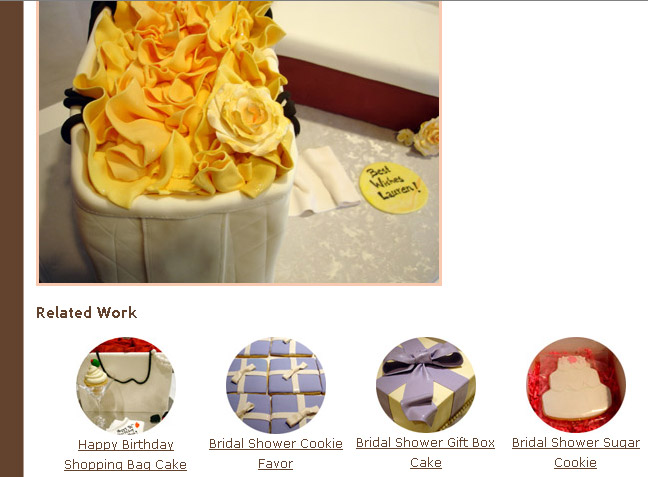
The modifications were fairly straightforward, the most difficult part was figuring out how to easily associate each post with the appropriate thumbnail image. With over 100 posts, it’s not something I wanted to do by hand. Fortunately, I had used a fairly consistent naming standard for each full sized image - cake01.jpg where 01 represented the image number. And I already had thumbnails created with the same naming convention - cake01-circle.jpg.
So, through mySQL I created a query to extract the image name from the post_content column in wp_posts and store it temporarily in an xref table:
I then updated my xref table to include the “-circle.jpg” naming convention:
And in the last step, I decided to use post_excerpt column to store the reference to the thumbnail:
Once the backend was set, I had to make a few modifications to the related-posts.php plugin. First I modified the Primary SQL Query to include the post_excerpt column in the select portion:
Next I modified the PHP code to output the thumbnail for each related post:
// related post. Note: not every post has an image. For those posts we will just display
// the title of the post
if ($post_excerpt == ”) {
$output .= $before_title. ‘<a href="’. $permalink .‘" rel="bookmark" title="Permanent Link: ‘ . $title . ‘">’ . $title. ‘</a>’ . $after_title;
}
// If the post_excerpt variable is NOT empty then contruct the link to the thumbnail and
// display that along with the title.
else
{
$link_name = ‘<img src="http://www.pinkcakebox.com/images/’ . $post_excerpt . ‘" style="border:none"/>’;
$output .= $before_title .‘<a href="’. $permalink .‘" rel="bookmark" title="Permanent Link: ‘ . $title . ‘">’ . $link_name . ‘</a>’ . ‘
‘;
$output .= ‘<a href="’. $permalink .‘" rel="bookmark" title="Permanent Link: ‘ . $title . ‘">’ . $title. ‘</a>’ . $after_title;
}
And with that final modification, the related posts plugin now displays a thumbnail along with each text link for related posts. See the live working version at our wedding cake blog.
Note: In retrospect, I should of explored using custom fields instead of the post_excerpt field for storing the reference to the thumbnail image. Also, for better portability to other sites I should of included the full link to the image in the post_excerpt field.