After many requests, I’ve finally added new functionality to the PHPList WordPress Integration plugin. The plugin now supports the ability to display multiple lists on the form. So if you manage multiple lists through PHPList and want to give the user the option of choosing which one to subscribe to, this is now supported the PHPList WordPress options panel.
To enable this feature go into the PHPList WordPress Options panel and click on the ‘Add Another List’ button. This will add a new row which allows you to enter another list ID and list name:

Once you add the list id and list name click on Save Options. Your form will automatically be updated:
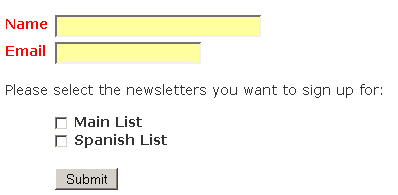
Note: In the future I plan on adding a capability to create multiple instances of the Phplist form with the ability to associate each instance with a different mailing list.
1 Comment
Jesse,
you might be interested in this WordPress Plugin/Widget that adds the subscription page as a sidebar widget:
http://www.geekzone.com.au/users/msnell/index.php?id=316
It gives a bit of extra flexibility, especially for placement on the sidebar.
It’s my first widget, so it’s a bit rough, but it works for me. :)
http://www.techdoctor.com.au